



Introduction
A Random Choice Picker is a web-based utility that selects one option randomly from a user-defined list. Decision-making sounds simple until you are faced with too many options.
A random choice picker is a simple digital tool designed to help users make decisions by selecting one option at random from a list of choices they provide. It removes bias, hesitation, and overthinking by letting a system handle the final selection fairly and instantly.
In this random choice picker project, users enter multiple words, names, or short phrases, usually separated by commas, into an input field. Once the input is complete, a trigger action such as pressing the Enter key or clicking a button tells the system to process the list. The tool then randomly selects one item and clearly displays it as the final result.
The main purpose of a random choice picker is decision support. People often struggle when faced with too many options, even for small choices like what to eat, what topic to study, or which name to pick. A random choice picker simplifies this by making a neutral selection in seconds.
Random choice pickers are widely used in everyday situations. Teachers use them to select students or quiz topics, content creators use them to choose ideas, and teams use them to assign tasks or pick winners fairly. Because the selection is random, it helps avoid favoritism and ensures transparency.
From a technical perspective, random choice pickers demonstrate how user input, logic, and output work together in an interactive system. They are commonly built as lightweight web applications because they do not require complex infrastructure and can run directly in a browser.
In this project:
- Users type words or phrases into an input area.
- Each item must be separated by a comma.
- Pressing the Enter key finalizes the input.
- The application randomly picks one choice.
- The selected option is displayed at the bottom below the text input section.
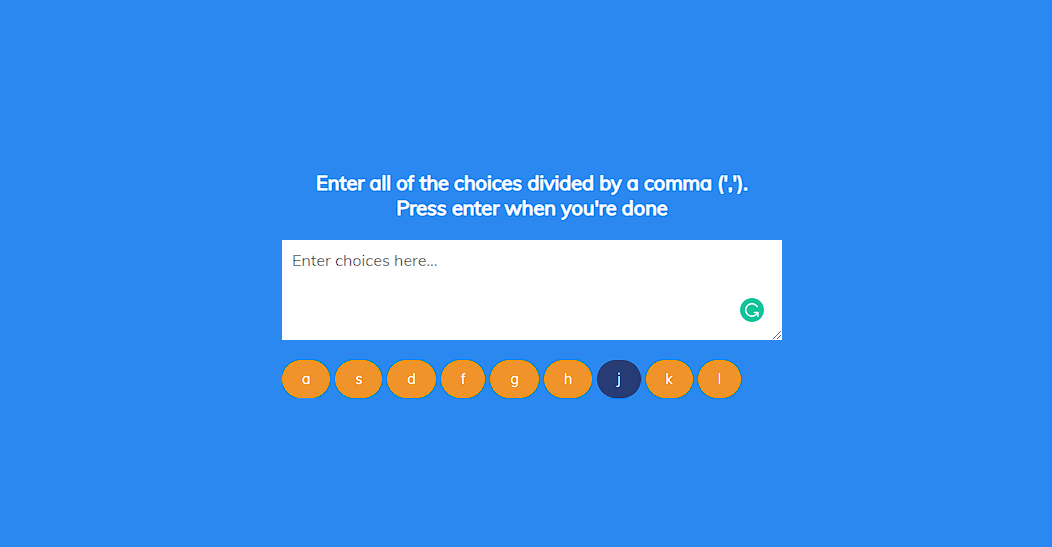
Project workflow
- The user types multiple choices in a single input field.
- Choices are separated by commas to form a list.
- The system listens for the Enter key event.
- JavaScript processes the input and removes unnecessary spaces.
- A random selection is made from the list.
- The final choice is displayed instantly on the screen.
Core functionality
Comma-Separated Input System
The project uses a comma-based input format. This approach is efficient because it allows multiple values to be entered quickly without extra buttons or forms. Users can add as many options as they want in a single line. This input method displays real-world tools such as spreadsheets and tag editors, making it intuitive even for first-time users.
Enter Key Interaction
Instead of clicking a button, the project uses the Enter key to trigger the selection. This keyboard-based interaction improves usability and speed. It also introduces learners to event-driven programming, which is a core concept in JavaScript. Keyboard events make the application feel responsive and modern.
Automatic Random Selection
Once the input is finalized, the application automatically picks one option at random. The randomness ensures fairness and removes bias from the decision-making process. This feature demonstrates how JavaScript can simulate unpredictability in a controlled environment.
Clear Result Display
The selected choice is displayed at the bottom of the interface, separate from the input area. This visual separation improves readability and ensures users immediately understand the result. The output is typically styled with larger text or contrasting colors to highlight the chosen option.
Lightweight and Fast Performance
Because the project relies only on HTML, CSS, and JavaScript, it loads instantly and runs smoothly on all modern browsers. No external libraries or frameworks are required. This makes the project ideal for learning and deployment without a complex setup.
Building the project
The Random Choice Picker project is developed using HTML5, CSS3, and JavaScript, maintaining a clean and easy-to-understand structure. HTML is used to organize and display the core elements on the screen, such as the instructions and the text area where users enter their choices. CSS enhances the visual appearance by applying background colors, spacing, and simple styling that keeps the interface clear and distraction-free.
JavaScript handles the main functionality. It processes the user’s input, identifies individual choices separated by commas, and controls the logic for selecting an option at random. During the selection process, JavaScript also creates a visual effect that highlights the picking action, making the interaction more engaging and easier to follow.
The project features a minimal layout with clear guidelines and a focused text input area, allowing users to understand how it works without any learning curve. Once the user finishes typing and confirms the input, the choices are generated automatically, and the final selection is displayed instantly.
This is a fully functional and browser-ready project that runs without any external dependencies. You can download the project, open it in a browser, and explore how a simple combination of HTML, CSS, and JavaScript can create an interactive and practical web application.
Why This Project Is Ideal for Beginners?
This project is small but powerful. It introduces several important concepts without overwhelming the learner:
- Event handling
- String manipulation
- Arrays and indexing
- Random number generation
- DOM interaction
- User input validation
How to use this project?
- Download the project.
- Extract the source code
- Set up an editor or IDE.
- Open the project folder in the editor. (sublime, atom,vs code)
- Launch the program in the browser. (chrome, firefox)
- Write and pick your random choice.
- Enjoy & Share.
Now that you understand how the Random Choice Picker project works, take the next step by building and experimenting with it yourself. Use this project to strengthen your understanding of HTML structure, CSS styling, and JavaScript logic. Download the project, explore its behavior in the browser.