

Introduction
A web-based discussion platform where users can interact through structured threads and responses is called an online forums. It is designed to allow users to post questions, share knowledge, debate ideas, and build communities around specific topics.
Online forums are one of the most powerful yet underrated tools on the internet. Long before social media algorithms controlled visibility, forums were already connecting people through meaningful discussions, problem-solving threads, and niche communities. There are categories and subcategories inside a normal forum. Users build discussion threads within certain sections. Conversations can develop over time as other members respond to those threads. Because these conversations in online forums have been stored, future readers looking for related topics can access them.
Stack Overflow, which concentrates on technical problem-solving and programming concerns, and Reddit, which divides debates into “subreddits,” are well-known instances of Internet forums. Quora is an additional illustration, where users pose and respond to knowledge-based queries on a range of topics. Forums often include user profiles, reputation systems, moderation tools, and community guidelines to maintain quality and credibility. Many businesses also use support forums to reduce customer service costs and provide peer-to-peer assistance.
How Online Forums Work
An online forums typically functions through the following structure:
- Categories – Broad topics such as Programming, Fitness, Business, etc.
- Subcategories – More specific sections like JavaScript, Python, or MERN Stack.
- Threads – Individual discussion posts created by users.
- Replies – Responses that build the conversation.
- Moderation – Admins and moderators ensure discussions remain constructive.
Types of online forums
General discussion forums
A broad range of subjects is covered in general discussion forums on a single platform. Numerous areas, including technology, lifestyle, entertainment, politics, and hobbies, are available for users to explore. Instead of concentrating on a particular area, these forums promote candid discussions. Discussions are arranged into topic-based communities on sites like Reddit. Through widespread involvement and a variety of content, general forums draw sizable audiences, encourage a range of opinions, and foster high levels of engagement.
Niche-specific forums
Niche forums concentrate on a certain topic, such programming, fitness, cars, or photography. Users who seek in-depth, specialized conversations are drawn to these groups. For instance, programming and technical problem-solving are the main topics of Stack Overflow. Discussions on niche online forums are frequently of higher quality since participants have similar interests and objectives. They are beneficial for professional networking, industry learning, and establishing authority in a certain field.
Support forums
Companies usually run support forums to assist users in resolving issues pertaining to their products. Consumers report problems, ask questions, and get responses from other users or moderators. Numerous tech companies use forums to create searchable knowledge bases and lessen the workload associated with customer assistance. These online forums facilitate peer-to-peer troubleshooting and increase transparency. By providing prompt solutions and fostering organized conversations about goods and services, support communities also boost client loyalty.
Private forums
Only those who have registered or paid can access private online forums. Professional networking opportunities, premium discussions, and special resources are frequently offered by these forums. They are frequently found in mastermind groups, coaching programs, and subscription-based websites. Private forums place a greater emphasis on regulated access and superior content quality than do public forums. These forums are useful for specialized learning and teamwork since members typically exchange sophisticated insights, business plans, or private conversations.
Building the project
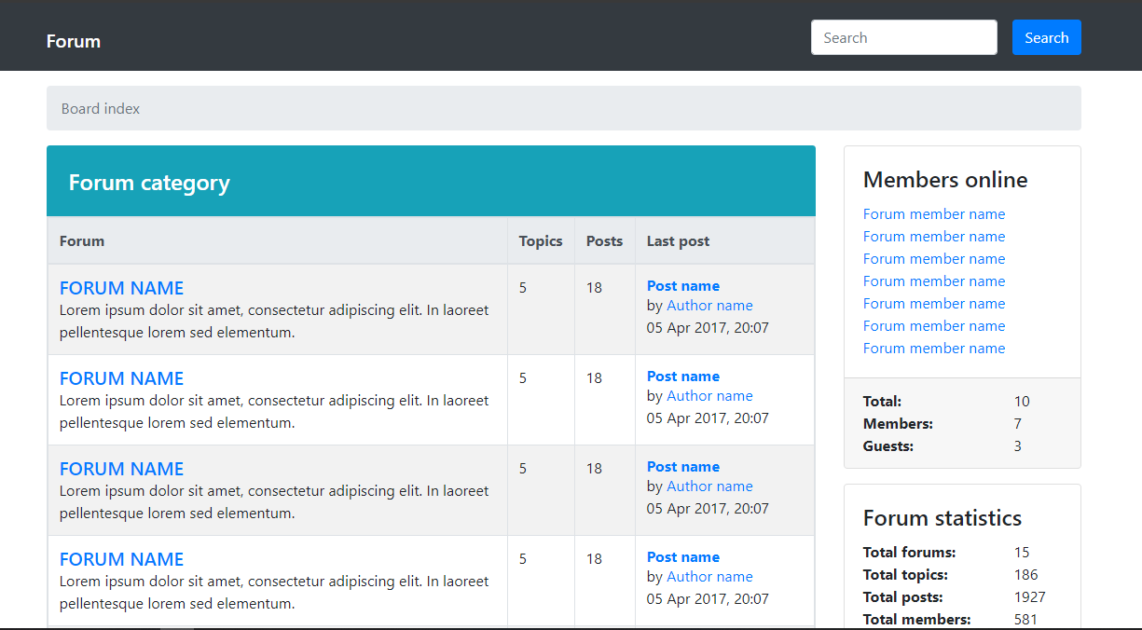
This forum project is built using HTML, CSS, JavaScript, and Bootstrap. HTML creates the structure of the pages, CSS gives everything its visual style, JavaScript adds interactivity, and Bootstrap makes sure the layout adjusts smoothly on different screen sizes. At the top of the page, a breadcrumb navigation helps users understand exactly where they are inside the forum. This small detail improves usability and prevents users from getting lost when browsing categories or topics. On the right side, there’s a section that shows which members are currently online.
It adds a sense of activity and makes the platform feel alive. Just below that, the forum statistics section displays the total number of forums, topics, posts, and registered members, giving users a quick overview of community engagement. Each category lists the forum name along with a short description, total topics, total posts, and details about the most recent post. When a user clicks on a forum name, they’re taken to a new page displaying all related topics. These topics include the author’s name, activity statistics, and the latest reply information.
Users can sort posts by newest or oldest and arrange them in ascending or descending order. A new topic button allows users to start their own discussion. Clicking on an author’s name also lets users explore other posts written by that member. Inside a topic, users can read the full discussion and leave comments. However, creating an account is required before posting. The footer section includes copyright information and terms of use.
This is a frontend onine forums based project, meaning backend features like database storage and user authentication are not implemented. Some functions may be limited or simulated. The purpose of this project is to understand layout design, user interface structure, and interactive elements.
How to use the project?
- Download the project and extract the source code.
- Set up an editor or IDE. (vs code, sublime text, atom)
- Open the project folder in the editor.
- Launch the project in the browser. (chrome, firefox)
- Use the online forums.
- Enjoy!
Download the online forums project, explore the layout, analyze how categories and topics are organized, and experiment with improving the interface. Modify the design, refine the sorting features, and challenge yourself to connect it with a backend in the future.
i really enjoy reading such a greate article, keep up the wonderful work, check out my site at eiffeltower-ticketparis.com