

Introduction
An ER Diagram (Entity Relationship Diagram) is a visual representation used to design and model the structure of a database. ER Diagram helps individuals to clearly understand the logical structure of the database.
An entity relationship diagram is one of the most fundamental tools in database design. Before writing a single SQL query or building backend logic, professional developers visualize how data connects. That visualization is done through an ER diagram. An ER diagram was introduced by Peter Chen in 1976 as part of the Entity-Relationship Model, which remains a core framework in relational database design. According to IBM, ER diagrams help designers visualize entities, their attributes, and the relationships between them before implementing a database structure (IBM).
ER diagrams may feel difficult and time-consuming, but avoiding them is a serious mistake. They are not optional in structured database design. In practice, ER diagrams are created before writing SQL code. They act as a blueprint for database architects and developers, helping teams communicate structure clearly and prevent design flaws. Whether building small applications or large enterprise systems, ER diagrams remain a critical step in structured database development. Some of the famous tools for designing ER diagrams are Creately, SmartDraw, LucidChart, Diagrams.net, etc.
ER diagrams help professionals to :
- Prevent redundant data
- Avoid poor table relationships
- Plan normalization properly
- Reduce future refactoring cost
- Communicate the database structure clearly to teams
Core Components of an ER Diagram
Entity
An entity is anything in real world system that can be uniquely identified. An entity can be a person, a place, objects, events, etc. Entities are the tables. A weak entity depends upon the existence of another entity. A weak entity cannot describe itself; it must use its foreign key to provide an appropriate result.
Attributes
The descriptive property of an entity is called attributes. For example, there is every student who can be recognized by their registration number. An entity can have many attributes, including the key attributes. An entity cannot be empty.
Relationship
A relationship is the association between entities. A relationship describes how the entities are related to each other. For example, a library can have many books, a teacher teaches many students, etc. The objective of an ER diagram is to model relationship among entities. The relationships that can be formed are:
- One-to-one (eg. A rider rides a cycle)
- One-to-many (eg. A teacher teaches many students at a time)
- Many to many (rg. Many readers read many books)
Symbols in ER Diagram are:

Rectangle – It is used for representing an entity.

Oval – It represents an attributes

Oval with underlne – It represents a key attribute.

Diamond – It represents relationship
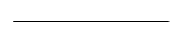
Undirectional line – It represents relationship many.

Directed line – It represents relationship one.
Real-World Example: E-Commerce ER Diagram
Let’s design a simple e-commerce system.
Entities:
- User
- Product
- Order
- Payment
Relationships:
- User places Order
- Order contains Product
- Order has Payment
Logical Flow:
- A User can place multiple Orders.
- Each Order can include multiple Products.
- Each Order has one Payment.
In database terms:
- User (1) — (N) Order
- Order (M) — (N) Product
- Order (1) — (1) Payment
Steps to Create an ER Diagram
Step 1: Identify Entities – What objects exist in the system?
Step 2: Identify Attributes – What properties describe each entity?
Step 3: Define Primary Keys – What uniquely identifies each entity?
Step 4: Identify Relationships – How do entities connect?
Step 5: Define Cardinality – Is it 1:1, 1:N, or M: N?
Step 6: Remove Redundancy – Check normalization logic.
Common Mistakes Beginners Make
Database structure is the foundation of any system. If the foundation is weak, everything built on top of it becomes unstable. Fixing an ER diagram early is simple. Fixing a live production database with real users, real transactions, and real dependencies is complex and risky. An extra hour spent designing properly can save weeks of debugging and restructuring. ER design is not about drawing shapes. It is about thinking clearly. The time you invest in planning directly determines the scalability and reliability of your system.
Some minor mistakes that beginners make:
- Not defining primary keys.
- Creating circular relationships.
- Ignoring normalization.
- Using too many weak entities.
- Mixing attributes with entities.
- Skipping ER design and jumping directly to coding.
Best Practices for ER Diagram Design
If you’re building serious systems, follow these principles:
- Avoid unnecessary attributes.
- Always define primary keys.
- Resolve many-to-many relationships properly.
- Keep naming consistent.
- Don’t mix business logic with structure.
- Normalize to at least 3NF for relational systems.
- Think long-term scalability.
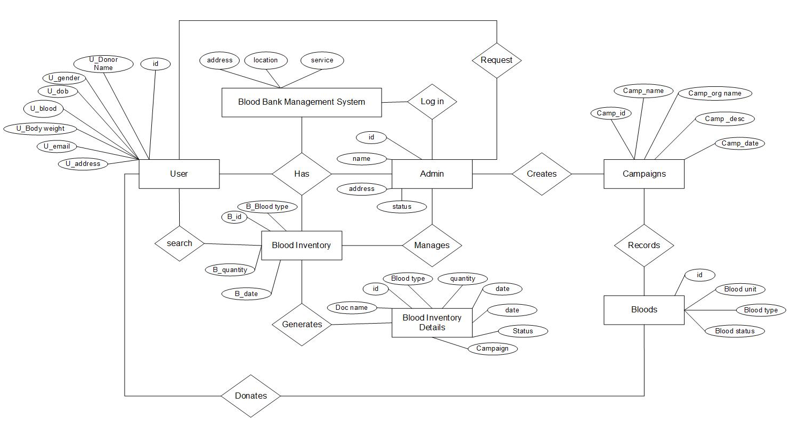
ER diagram for blood bank
Incredible post! The amount of useful information here is amazing. I have been searching for something like this for a while and finally found it. Thank you for putting this together!
Fantastic content as always! I really enjoyed reading this post. The information is presented so clearly and the examples are really helpful. Thank you for taking the time to write this!
Love this post! So helpful and well-written. I have been looking for exactly this kind of information. Your blog is one of my favorites – always such quality content. Thank you!
Really enjoyed this article! The depth of information here is impressive. I appreciate how you break down complex topics into easy-to-understand content. Will definitely be back for more!