



Introduction
Flutter utility app is just another tip calculator app built using the Dart programming language. It is a cross-platform app that works seamlessly on both Android and iOS platforms.
One of the most useful beginner-to-intermediate projects you can create while learning mobile development is a Flutter utility app. It helps you comprehend Flutter’s UI design, state management, and user interaction while swiftly solving practical problems like splitting bills and calculating tips. Flutter, developed by Google, enables developers to create cross-platform applications with a single codebase. Its fast rendering engine and widget-based architecture make it ideal for building responsive and visually appealing apps.
Instead of manually figuring out percentages or using a basic calculator, this app allows users to input the bill amount, select or adjust a tip percentage, and instantly see the calculated results in real time. Users enter the bill amount and select a tip percentage (usually 10%, 15%, or 20%) in a conventional tip calculator app. The tip amount is then computed by the app and added to the original bill to show the total. A bill-splitting feature, which enables customers to share the entire amount among several persons, is also included in many editions. This is particularly helpful when dining in a group setting, when costs must be distributed equitably.
The application takes advantage of Flutter’s reactive user interface (UI) architecture, which allows for instantaneous interface adjustments in response to user input changes. In addition to enhancing user experience, this real-time interaction illustrates fundamental Flutter ideas like state management and widget-based design. Flutter’s programming language, Dart, is designed to facilitate quick application development and effective user interface rendering. The Flutter utility app is more than just a basic project. It serves as a strong foundation for understanding user input handling, UI design, and real-time data processing, making it an essential project for anyone learning Flutter development.
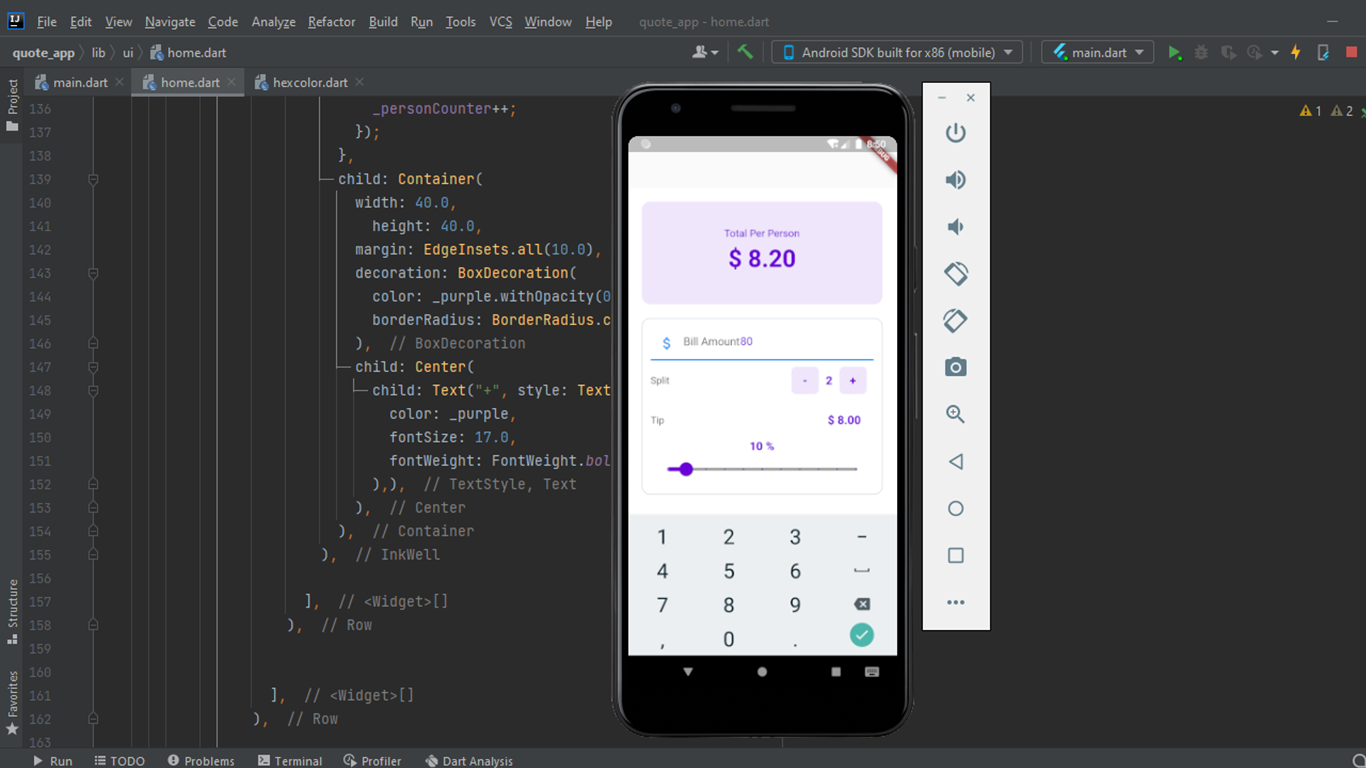
How does utility app work?
At its core, a Flutter utility app is driven by simple mathematics, but the real value comes from how smoothly and instantly those calculations are presented to the user. The app takes three inputs: bill amount, tip percentage, and number of people, and processes them in real time to deliver accurate results without any manual effort.
Basic Formula
The logic behind the utility app is straightforward and built on three key calculations:
- Tip Amount = Bill × (Tip Percentage ÷ 100)
- Total Bill = Bill + Tip
- Per Person Cost = Total Bill ÷ Number of People
When a user enters the bill amount, the app immediately uses the selected tip percentage to calculate how much extra should be added as a tip. This value is then combined with the original bill to produce the total payable amount. If multiple people are involved, the app divides the total equally to show how much each person needs to pay. For instance, the software computes a $15 tip if the bill is $100 and the tip is set to 15%, making the total $115. Each of the two individuals splitting the amount pays $57.50. Thanks to Flutter’s reactive UI architecture, the entire process occurs quickly as soon as the inputs change.
Building the project
Creating a Flutter utility app is a useful method to learn about the structure of contemporary mobile applications and how real-time user interaction operates. Dart, the programming language that powers Flutter, is used in this project. It was created especially for quick, cross-platform client-side application development. The official Dart documentation claims that it is designed for creating high-performance applications with fluid user interface rendering.
Flutter’s widget-based architecture is essential to this project. The interface is constructed by combining the widgets that make up what you see on the screen. A StatefulWidget is utilized because the application uses dynamic calculations, such as changing the tip amount when inputs change. This enables the application to rapidly update its user interface (UI) whenever the user modifies values such as the tip percentage or bill amount.
Common Flutter elements like Row and Column for alignment, Container for spacing and styling, and Scaffold for the overall screen structure are used to organize the layout. Together, these components produce an interface that is clear and responsive. These layout widgets assist in effectively arranging content across various screen sizes, as explained in Flutter’s official UI guide.
All things considered, this utility app project is straightforward but quite useful for learning. It presents important Flutter ideas without being unduly complicated. An emulator or a real device, which Flutter supports out of the box are required to execute and test the application. Real learning occurs when this project is built and experimented with, not only when it is read about.
How to use this project?
- Download the project.
- Extract the source code.
- Set up an editor or IDE. (vs code, IntelliJ idea, android studio)
- Copy the folder and files to your project.
- Launch the program in the emulator.
- Test and use the user.
- Enjoy & Share.
Stop treating this utility app like just another tutorial project. If you cannot build a clean, responsive tip calculator with real-time updates, then your fundamentals are still weak. Build it yourself from scratch, break it, fix it, and refine it until it feels smooth and professional. Click the download button below and get experienced by yourself.
I like how simple this is explained.
Great explanation of the topic.