

Introduction
A password generator is a tool that generates strong, random, and secure passwords by combining letters, numbers, and special characters. This project is coded in html, css and JavaScript.
The basic or primary purpose of a password generator is to enhance security. Many people reuse simple passwords across several accounts, resulting in a huge risk. If one account is compromised, others are simply accessible. A password generator minimizes this issue by creating a unique password for each account. According to the National Institute of Standards and Technology(NIST), strong and unpredictable passwords are an important component of modern authentication techniques. Their official rules recommend choosing long, random passwords over easily guessable ones.
A password generator is a digital project that generates strong, random, and secure passwords automatically. Rather than using human-generated passwords, which are frequently predictable and easy to guess, a password generator uses algorithms to generate complex combinations of characters. These combinations usually comprise capital and lowercase letters, numerals, and special symbols, making them extremely difficult to hack attempts like brute-force or dictionary assaults.
A password generator is an essential tool in this modern AI era. Users can customize the length of their passwords and whether they include numbers, symbols, or certain character types. Longer and more complicated passwords are more secure. For example, a 12 character random password is much more difficult to crack than a short, straightforward one. In an era of digitalization and increasing cyber threats, a password generator is not an optional tool for generating password but it is a basic requirement.
How does the password generator work?
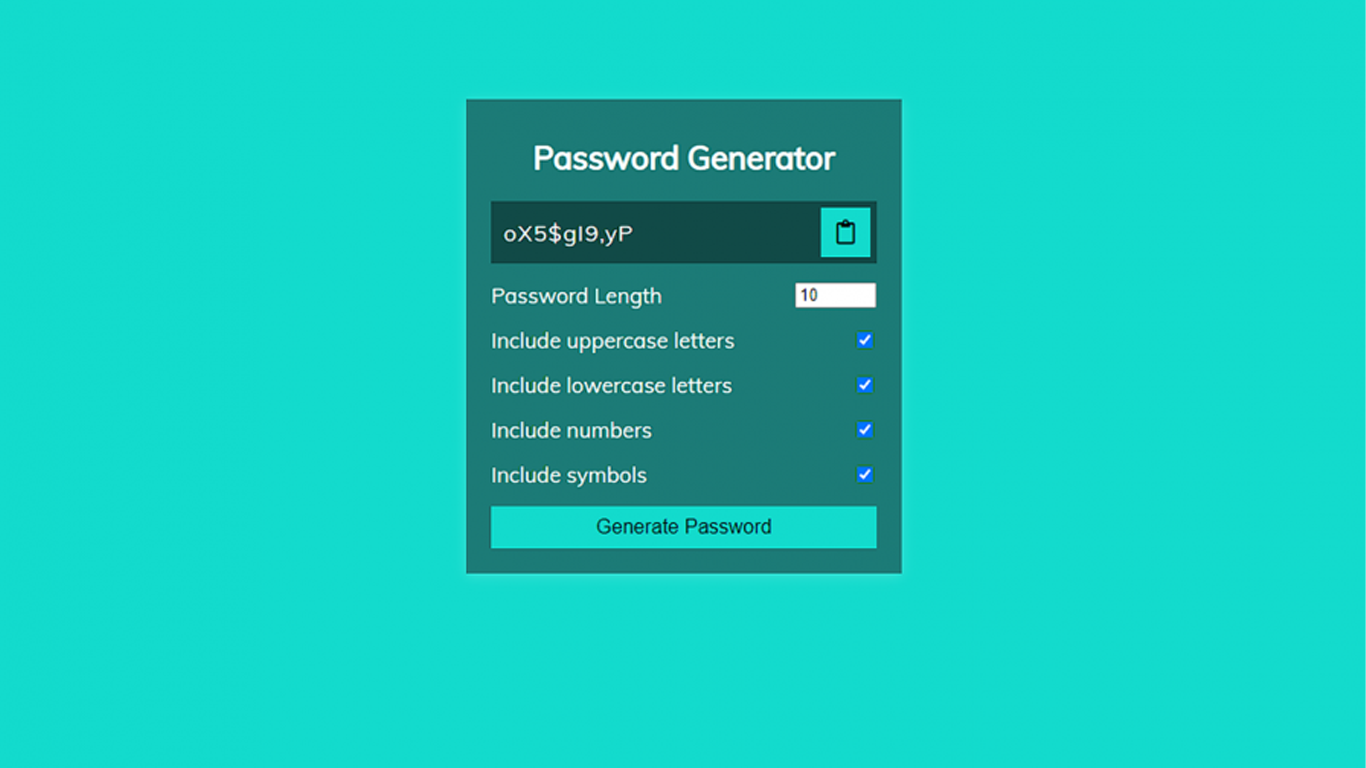
This password generator project is built using HTML, CSS, and JavaScript, making it a lightweight and accessible web-based tool. The layout, including input fields, buttons, and display regions, is structured with HTML. By improving the interface’s visual appeal, CSS makes it clear, contemporary, and easy to use. The application’s brain is JavaScript, which manages logic, creates random passwords, and dynamically updates the user interface.
A user can choose the length of their preferred password and the kinds of characters they choose to use when interacting with the application. JavaScript takes this data and quickly generates a random password when the generate button is clicked. The outcome appears on the screen, prepared for copying and utilization. Because the system employs built-in randomization algorithms to guarantee unpredictability, it runs well. Even when the same conditions are chosen again, every created password is unique. The tool’s effectiveness stems from this unpredictability.
Why do strong passwords matter?
Strong passwords are the first and only line of defence between the attacker and personal data. Passwords are used for identity verification in all online accounts, including social media, banking, email, and cloud storage. Your password becomes a prime target for hacking techniques like dictionary attacks, brute-force attacks, and credential stuffing if it is weak, predictable, or often used.
People underestimate how quickly weak passwords may be cracked, which is one of the main issues. Automated systems may guess simple passwords like names, birthdays, or frequent terms in a matter of seconds. Attackers can steal confidential information, prevent you from accessing your own accounts, or even perpetrate financial fraud once they get access. The harm is not limited to technological issues; it can also have an impact on your finances, reputation, and identity.
Strong passwords reduce the risk of getting hacked and lower the danger. A strong password is far more difficult to figure out since it combines capital and lowercase letters, numbers, and symbols. Another important factor is length. Even with advanced systems, cracking longer passwords takes a very long time because there are exponentially more possibilities.
Benefits of using a password generator
- Strong passwords make it very difficult for hackers to access your accounts through automated attacks or guesswork.
- Protects your files, emails, financial information, and personal information from theft or abuse.
- Brute-force, dictionary, and credential-stuffing attacks are prevented by complex passwords.
- It guarantees that other accounts are safe even if one is compromised.
- Serves as cybersecurity’s first and most crucial line of defense.
- Strong passwords make it more difficult for hackers to steal your identity or impersonate you.
- Strong passwords make it harder for attackers to impersonate you or misuse your identity.
- Reduces the chances of account recovery, resets, or dealing with hacked accounts.
How to use this project?
- Download and extract the source code.
- Set up an editor or IDE.
- Open the project folder in the editor. (atom, vscode, sublimetext)
- Launch the program in the browser. (chrome, firefox)
- Generate your first password.
- Enjoy & Share
Stop relying on weak, predictable passwords. That habit is a liability. If your accounts matter, your security needs to match that. Use a password generator right away. Make sure every account has a long, random, and distinctive password. To avoid using your memory, pair that with a password manager. If you continue to reuse passwords, you are sacrificing security for convenience, which will ultimately cost you money.
Examine your current files right now. Every weak or frequently used password should be changed. Your highest-risk access points are email, banking, and key platforms, so give them top priority. Click the download button below to get the source code for this project.