

Introduction
A Flutter login app is one of the most practical and high-impact projects for modern mobile development. It is a simple login form that helps us to sign in to the system. It is easy to use and understand.
Flutter login functionality is the gateway to user-centric features such as profiles, personalization, cloud data sync, and secure access control. With Flutter, developers can design fast, visually consistent, and scalable login experiences that work seamlessly across platforms. This makes a Flutter login app an ideal foundation for a real-world mobile app. applications targeting both Android and iOS users. For authentication operations, Flutter’s reactive user interface model is quite useful. Real-time validation, toggles for password visibility, loading states, and error reporting are frequently needed on login windows.
Users receive immediate visual reactions to their activities because of Flutter’s seamless handling of these interactions. Another major advantage is Flutter’s widget-based architecture. Every element of the login interface, text fields, buttons, icons, and animations, is a reusable widget. This modularity allows developers to design clean and maintainable login screens while keeping branding and UI consistency intact across the app. As Google backs Flutter, it also benefits from strong ecosystem support, frequent updates, and long-term reliability.
Building the Flutter Login App
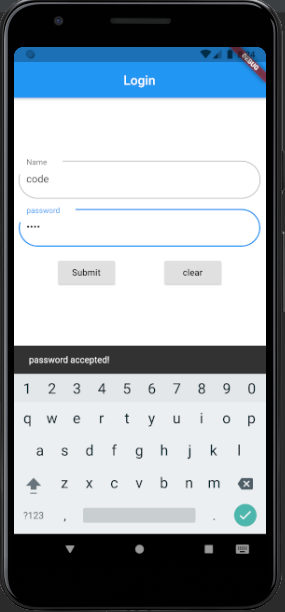
This Flutter login app project is built entirely using the Dart programming language, which is optimized for fast and smooth app development across platforms. Dart works on a widget-based structure, and in this project, stateful widgets are used to manage user interaction and dynamic changes on the screen. The login interface features clean text fields with rounded outline input borders, giving the app a modern and user-friendly appearance.
When a user enters the correct login credentials, a toast message is displayed to provide instant feedback. The layout is created using core Flutter components such as rows, columns, containers, and list views, all organized within a scaffold to maintain a structured and responsive design. Each widget plays a clear role, making the project easy to understand and modify.
Overall, this is a simple, beginner-level Flutter project that focuses on clarity and usability rather than complexity. An emulator is required to test the application during development. Downloading and running this project is a practical way to gain hands-on experience with Flutter basics and understand how a login flow works in a real mobile app environment.
Real-World Use Cases
Real-world applications, including social networking services, productivity tools, e-commerce platforms, and educational apps, frequently deploy Flutter login apps. In each scenario, the login page serves as a trusted entry point for users to access the main functions of the program.
Teams may continuously enhance login flows based on user input because Flutter allows for quick iteration. In competitive marketplaces where user experience directly affects retention and conversion rates, this flexibility is essential.
How to use this project?
- Download the project.
- Extract the zip file & get the project files and folders.
- Set up an editor or IDE. (IntelliJ idea, vs code, android studio)
- Copy the folder to your project.
- Launch the program in the emulator.
- Enjoy & Share.
Download the Flutter Login App project, run it on your emulator, and explore how widgets, layouts, and state work together in a real login flow. Use this project as your starting point to practice Flutter fundamentals and confidently move toward building complete, production-ready mobile applications.
FAQs
1. What is the Flutter login app project?
It is a beginner-level mobile application that demonstrates how to build a simple login screen using Flutter and the Dart programming language.
2. Which programming language is used in this project?
The entire project is developed using Dart, which is the core language used by Flutter for building cross-platform applications.
3. Is this Flutter login app suitable for beginners?
Yes, this project is designed specifically for beginners who want to understand Flutter widgets, layouts, and basic state management.
4. What type of widgets are used in the login app?
The project uses stateful widgets along with common Flutter widgets such as Row, Column, Container, ListView, and Scaffold to structure the UI.
5. How does the app respond to correct login credentials?
When the user enters valid credentials, the app displays a toast message to confirm a successful login.
6. Do I need an emulator to run this project?
Yes, an Android or iOS emulator is required to test and run the Flutter login app during development.