


Introduction
The bounce game is a project-based game developed using the Python programming language. It is designed to be simple, intuitive, and beginner-friendly, making it easy to understand.
The bounce game in Python is one of the most effective beginner-friendly projects for learning game logic, animation, and event handling while still being engaging enough to feel like a real product. This is one of the most beginner-friendly projects for learning game logic, graphics, animation, and event handling that is nevertheless captivating enough to seem like a real product.
A bounce game is a 2D interactive program where an object, usually a ball, moves within a defined area and changes direction when it collides with walls, paddles, or other obstacles. In Python, this type of game is most commonly built using lightweight game libraries that handle graphics rendering, keyboard input, and frame updates. Basic programming concepts that can be applied to larger game engines and even non-gaming applications are taught via this game implementation.
The bounce game has these features
- Continuous motion using loops
- Real-time input handling
- Collision logic based on coordinates
- Incremental difficulty or scoring systems
Why bounce game?
Many beginners become overwhelmed when they plunge right into a large project. The bounce game avoids this pitfall. It is modest enough to be completed quickly while yet exposing you to real-world software engineering techniques.
These are some key reasons for using the project.
- It converts abstract math concepts into visible movement
- It teaches state management without complexity
- It builds intuition for frame-based execution
- It introduces game loops, a core idea in interactive systems
What will you learn?
- Logical problem-solving
- Real-time program execution
- Event-based input handling
- Visual debugging through movement
- Structured thinking using game states
Building the game
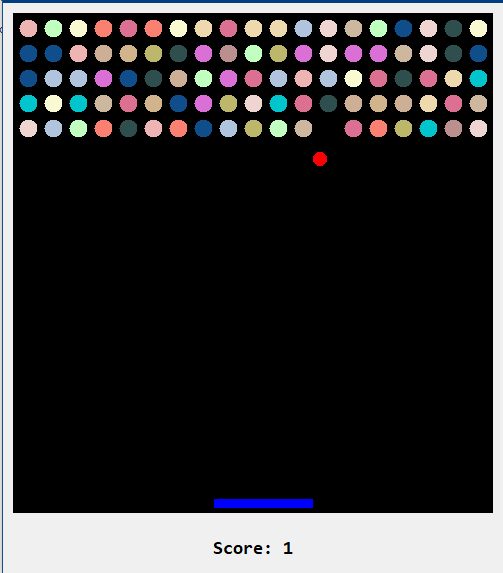
The bounce game, built with the Tkinter library, relies on simple yet effective 2D graphics to create an interactive visual experience. Tkinter is Python’s standard GUI library, and while it is not a full-fledged game engine, it is powerful enough to handle basic animations, shapes, and real-time updates required for a bounce-style game. The graphics prioritize clarity, responsiveness, and smooth motion over elaborate visual effects.
The core of the game’s graphics is the Tkinter Canvas, which acts as a drawing area where all visual elements are displayed. The ball is usually represented as a simple circular shape drawn on the canvas. Its smooth motion is achieved by repeatedly updating its position at very short time intervals. The background of the game is intentionally minimal. A solid color is commonly used to ensure that the moving ball and other elements remain visually distinct.
The game window itself acts as the boundary. When the ball reaches the edges of the canvas, it visually appears to bounce back, reinforcing the concept of collision detection. Because Tkinter updates graphics in real time, the bounce effect feels immediate and natural, even though it is driven by simple coordinate calculations behind the scenes. Some bounce games include paddles, blocks, or platforms drawn as rectangles on the canvas. This makes the game accessible, lightweight, and effective as both a learning project and a playable application.
How to use this project?
- Install python version 3.
- Download the project and extract the source code.
- Set up an editor or IDE. (vs code, pycharm, anoconda)
- Open the Python file in an editor.
- Execute the program.
- Play the game
- Enjoy!
If you want to strengthen your Python skills through real, hands-on practice, the Bounce Game using Tkinter is an ideal place to start. Build it, experiment with the graphics, and challenge yourself to add new features, such as score tracking, speed control, or interactive obstacles.
Download and start exploring, refine the game step by step, and turn this simple project into a strong foundation for more advanced Python applications.