


Introduction
A video downloader is a Python program that helps in downloading videos from online platforms like YouTube and saves them locally. It is both easy to use and implement.
Python video downloader is one of the most useful beginner-to-intermediate projects you can make is a Python video downloader. It blends fundamental programming ideas like HTTP requests, file handling, and automation with practical applications. This tutorial will teach you how to use Python to create a fully functional YouTube video downloader.
The video downloader operates by receiving a video URL as input. After interacting with the platform’s servers, the Python script extracts the available video streams (in various formats and resolutions) and lets the user choose which version to download. The file is saved locally on the machine when it has been chosen.
Pytube, which makes interacting with YouTube’s video data easier, is the most widely used library for this purpose. For more complex use cases, such as downloading playlists, subtitles, or high-quality music, additional utilities like yt-dlp or youtube-dl can be utilized.
Applications of this kind are frequently used for both personal and educational objectives, such as storing lectures, tutorials, or content for offline viewing. From a development standpoint, creating a video downloader aids with comprehending fundamental programming ideas such as managing files, handling external libraries, handling network requests, and putting error handling into practice.
How this project works?
First it accept a YouTube video URL
- Connect to YouTube servers
- Fetch available video streams
- Select a stream (resolution/format)
- Download and save the file locally
- Play the file saved locally.
Step by Step workflow
Step 1: Import required libraries
from pytube import YouTube
The first and must not forget part of the project where we import pytube library
Step 2: Get video URL input
url = input("Enter YouTube video URL: ")
you can use any vide url
Step 3: Create YouTube object
yt = YouTube(url)
This object fetches all metadata related to the video such as title, views, streams, and thumbnails.
Step 4: Display video information
print("Title:", yt.title)
print("Views:", yt.views)
Here you can give video details and add other details as well.
Step 5: Select video stream
stream = yt.streams.get_highest_resolution()
You can filter streams based on resolution or type.
Step 6: Download the video
print("Downloading...")
stream.download()
print("Download completed!")
Full source code
from pytube import YouTube

def download_video():
    try:
        url = input("https://www.youtube.com/watch?v=BVeKZV9crSY: ")

        yt = YouTube(url)

        print("\nVideo Details:")
        print("Title:", yt.title)
        print("Views:", yt.views)

        print("\nAvailable Streams:")
        for stream in yt.streams.filter(progressive=True):
            print(stream)

        choice = input("\nEnter resolution (e.g., 720p, 1080p): ")

        stream = yt.streams.filter(res=choice, progressive=True).first()

        if stream:
            print("\nDownloading...")
            stream.download()
            print("Download completed successfully!")
        else:
            print("Resolution not available. Downloading highest quality...")
            yt.streams.get_highest_resolution().download()
            print("Download completed!")

    except Exception as e:
        print("Error:", e)

download_video()
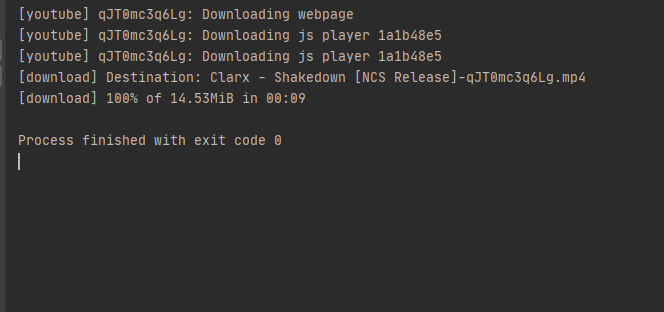
Output
Key features of video downloader
- Allows users to download videos from websites like YouTube by entering a simple URL.
- Enables the choice of video quality (such as 360p, 720p, or 1080p) depending on the streams that are accessible.
- Extracts and shows video metadata, including views, duration, and title.
- Allows for the single or mixed download of audio and video streams.
- It automatically switches to the highest quality possible in the event that the chosen choice is not available.
- It allows for the batch download of several videos in a single operation.
- It can be further expanded with file management tools, progress bars, and graphical user interfaces.
Benefits and Limitations
Benefits
- Downloads videos automatically and doesn’t rely on websites with a lot of ads.
- It enables quick and direct downloads via scripts, saving time.
- Improves accessibility by operating offline after the video has been downloaded.
- It teaches developers practical Python skills such as file management and APIs.
- Adaptable to certain requirements, like format choice or storage location.
- It an be expanded into more sophisticated tools or incorporated into bigger systems.
- Compared to full software applications, it is efficient and lightweight.
- Further supports automated operations, such as scheduled tasks or mass downloads.
- It gives complete control over the output format and download quality.
- Also serves as a solid portfolio project that shows off actual coding skills.
Limitations
- It relies on third-party libraries, which could malfunction when platforms change.
- If misused, it can be against the platform’s terms of service.
- It might be restricted functioning in the absence of extra programs like ffmpeg.
- Needs ongoing maintenance and manual updates as it is hard coded.
- There may be limitations on some videos that make it impossible to download.
- No GUI built in unless specifically created.
- System resources and internet speed can affect performance.
- Error handling for broken links and edge circumstances can be challenging.
- If copyrighted content is downloaded without authorization, there are legal implications.
- Without major modifications, video downloader is not scalable for commercial or large-scale use.
Stop treating this like a finished project it’s not. Right now, it’s a basic script that anyone can copy. Copy the source code and get experience of video downloader project by yourself. If the project fails, make sure you debug by yourself because the project file may vary from one device to another.
Thanks for sharing this useful information.