

Introduction
A Flutter movie app is a cross-platform mobile application that retrieves mobile data from an external API and displays it in its structured and user-friendly interface.
A Flutter movie app is one of the most practical and simple projects for understanding modern mobile app development. It blends real-world functionality with key principles such as API integration, state management, and user interface design. Instead of developing static applications, this project shows you how to design a dynamic app that retrieves and displays real-time movie data from external sources. Instead of depending on manually saved data, the software retrieves real-time information from online movie databases like The Movie Database (TMDb) or the OMDb API.
This allows the app to keep current with the latest movies, ratings, and descriptions without requiring regular human updates. The primary function of a Flutter movie app is to provide a list of movies in a structured and visually pleasing format. When the app loads, it sends a call to the API, receives data in JSON format, and converts it to a readable structure. The user usually sees a scrollable list or grid of movies, each with a poster image, title, and basic information. When a user selects a movie, the app takes them to a comprehensive screen that displays extra information such as the synopsis, release date, and rating.
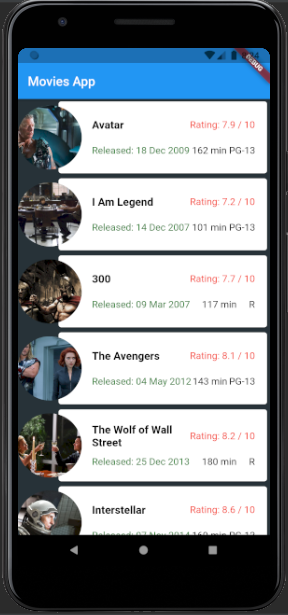
On the main screen, the app normally displays a list of movies, which are often presented in the form of cards or grids. Each movie entry includes important information such as the movie poster, title, rating, and release year. When a user picks a movie, they are directed to a comprehensive view that includes extra information such as a description, genres, and, in some cases, cast information. This type of application is commonly utilized in streaming platforms and entertainment services, making it an excellent project for developers looking to create production-ready apps.
Key features of the movie app
- Display a dynamic list of movies retrieved from an external API.
- Displays movie posters, titles, ratings, and release dates in a tidy layout.
- Detailed movie screen with full description, overview, and more information.
- Smooth navigation between the movie list and the detail pages.
- Use the search functionality to rapidly find specific videos.
- A scrollable interface (vertical and horizontal) allows for easy browsing.
- Real-time data updates don’t require app upgrades.
- Built with Flutter widgets, the UI is responsive and user-friendly.
- Quick performance with smooth animations and transitions.
- Error handling and loading indications improve user experience.
- Option to add favorites or a watchlist (in advanced versions).
- Works across Android and iOS with a single codebase.
Building the project
The Flutter movie app was created using Dart, a modern programming language designed for creating quick and responsive applications across multiple platforms. Rather than relying on complex structures, the project is based on Flutter’s widget-based architecture, which improves development organization and efficiency. The app’s behavior and UI are managed using both stateful and stateless widgets, which enable dynamic updates when data changes while keeping other parts simple and static.
The Flutter movie app has a clean and user-friendly interface, making it simple to navigate even for first-time users. It consists of two primary screens: the first displays a list of movies, and the second displays extensive information on a specific movie. The transitions between these screens are fluid, resulting in a seamless user experience.
To make the app more dynamic, movie data, including photos and descriptions, is obtained via an external API. This allows the app to display stuff in real time rather than depending on static data. The movie list is presented in scrollable views, allowing users to navigate vertically and horizontally through different movie items without friction.
Since the app uses internet images, the required permissions are set to ensure that they load and display properly. The layout is designed with core Flutter components such as rows, columns, containers, and hierarchical widget hierarchies, which aid in content organization on the screen. Overall, the project is simple and user-friendly, but robust enough to demonstrate real-world program capabilities.
Benefits of the Flutter movie app
- Displays a dynamic list of movies retrieved from an external API with real-time changes.
- Displays movie posters, titles, ratings, and release information in a neat and structured interface.
- Provides a detailed movie screen with full description, overview, and more information.
- Smooth navigating across screens for a smooth user experience.
- Search capability allows you to rapidly find specific movies without going through huge listings.
- Scrollable interface (vertical and horizontal) for easy browsing.
- High performance with quick rendering and smooth animations.
- Developed with a single codebase for both Android and iOS, minimizing development time.
How to use this project?
- Download the project.
- Extract the zip file & get the folder.
- Set up an editor or IDE. (vs code, android studio, IntelliJ idea)
- Open the project folder on the editor.
- Launch the program in the emulator.
- Use the movie app.
- Enjoy & Share.
The Flutter movie app is a powerful example of modern mobile app development. Set a deadline. Build the movie list. Fetch real data. Display it cleanly. Add a detail screen. Then improve its search, favorites, and performance optimization. Download the movie app project by clicking the button below and get experienced by yourself.