

Introduction
A location app allows users to interact with a digital map by tapping or placing markers on specific locations to get their information. It is a Java-based mobile application based on android platform.
A location app is a mobile application that uses a device’s geographic position to provide location-based information or services to the user. These apps rely on technologies such as GPS, mobile networks, and Wi-Fi to determine where the user is and then deliver relevant, real-time data based on that location. At its core, a location app works by collecting latitude and longitude coordinates from the device and translating them into meaningful information. Instead of showing raw coordinates, the app usually displays human-readable details such as the place name, city, nearby landmarks, or points of interest.
Many location apps integrate mapping platforms like Google Maps to provide accurate maps, smooth navigation, and reliable geographic data. Location apps are widely used in everyday life. Navigation apps assist users in finding routes, estimating travel times, and avoiding traffic. Ride-hailing and delivery apps track drivers and orders in real time. Social media apps use location features to tag places or discover nearby content. Even fitness and health apps rely on location tracking to measure distance, speed, and outdoor activity routes. A common feature of many location apps is interactive map functionality.
Users can tap on a map, mark a location, or search for places. When a location is selected, the app can display details such as the area name, address, or nearby facilities. This makes location apps intuitive and useful even for users with little technical knowledge. From a development perspective, location apps are important because they combine multiple concepts: user interaction, real-time data, map visualization, and external service integration. They demonstrate how digital applications can connect the physical world with software systems. In this Android Java project, the core interaction is simple: the user taps on the map, and the app displays the name of the tapped area
Why a location app for beginners?
The reason for building a location app as a beginner has several benefits and skills.
- Teaches real-world Android development by working with maps and physical locations instead of abstract data.
- Introduces API integration using Google Maps, helping beginners understand how real apps depend on external services.
- Helps beginners learn user interaction handling, such as tapping on the map and responding to user actions visually.
- Builds understanding of location data concepts, including latitude, longitude, and converting them into readable place names.
- Improves knowledge of UI updates and event listeners, which are core Android development skills.
- Encourages logical thinking by connecting user input with map output and displayed information.
- Provides a portfolio-ready project that looks practical and professional even at a beginner level.
- Boosts confidence and motivation because results are visible instantly on the map.
- Requires minimal complex logic, making it easier to learn without feeling overwhelmed.
- Creates a strong foundation for advanced topics like navigation, geofencing, and real-time tracking.
User interface design
The success of a location app depends heavily on usability. This project focuses on a minimal and distraction-free interface:
- Full-screen map view for better visibility
- Clear markers that stand out on the map
- Simple text display for location names
- Smooth touch gestures and transition
Core functionality
Interactive Map Interface
The app launches with a clean, responsive map interface that feels instantly familiar to users. Standard gestures such as zooming, panning, and scrolling work smoothly, allowing users to explore locations naturally. This intuitive design minimizes confusion, reduces the learning curve for first-time users, and ensures the app feels easy and comfortable to use from the start.
Tap-to-Mark Feature
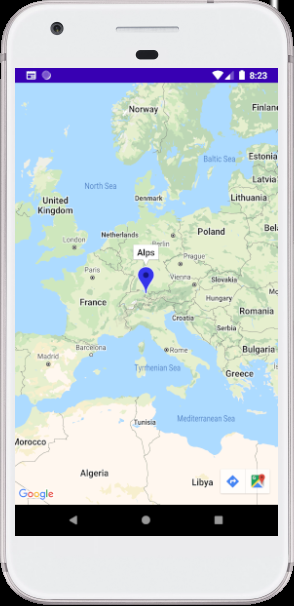
The tap-to-mark feature allows users to simply touch any point on the map to place a marker. This action visually highlights the selected location, making the interaction clear and engaging. It helps users precisely select places of interest without complex inputs, improving accuracy while keeping the overall experience simple and beginner-friendly.
Area Name Display
Once a location is marked, the app automatically identifies and displays the name of the tapped area. Depending on the location, this may include a neighborhood, city, district, or well-known place. Showing readable location names instead of coordinates makes the app more informative, user-focused, and practical for everyday use.
Real-Time Feedback
The app provides instant feedback for every user action. As soon as the map is tapped, the marker appears and the location name is displayed without noticeable delay. This real-time response creates a smooth and satisfying experience, reinforcing user confidence and making the app feel fast, reliable, and professionally built.
How to use this project?
- Download the project.
- Extract the source code.
- Open android studio IDE.
- Set up project in android studio.
- Execute the project in an android emulator.
- Use the location app project.
- Enjoy!
Start building your own location-based Android app today and turn maps into meaningful, interactive experiences. This project is perfect for strengthening your Android Java skills while working with real-world data and user interaction.
Explore new locations, experiment with features, and enhance your app step by step. Download the project, customize it, and take your Android development journey to the next level.