



Introduction
The Auction Project in Python is a powerful beginner project that teaches essential programming concepts through a real-world scenario. It is easy to use and implement.
A Python auction project is a console-based application that gathers bids from several users and chooses the winner based on the highest bid amount. The system keeps taking bids until there are no more bidders after each participant inputs their name and bid amount. It is a command-line program that mimics a real-world auction process and is both user-friendly and powerful.
For students, novices, and aspiring Python developers who wish to improve their comprehension of loops, dictionaries, functions, user input processing, and program flow control, this project is perfect. The logic employed in this auction system, despite its simplicity, is similar to the fundamental workings of actual online bidding systems.
When you execute this auction project, you will see an asci art and some text. You are asked to enter your name and price first. After you enter the price, the system will ask again for another bidder. If there is another bidder who says yes, then he will bid higher price than the previous and if no the highest bidder takes the assets.
Key features of auction project includes:
- Interactive command-line input
- Real-time bid tracking
- Automatic highest-bid calculation
- Clean and structured program logic
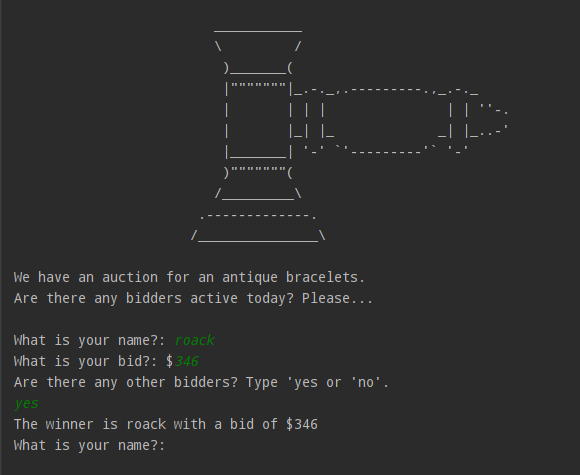
How the auction project works?
- Display an auction logo and introduction message
- Ask users if bidders are active
- Collect bidder names and bid amounts
- Store bids securely in a dictionary
- Continue the auction until no bidders remain
- Determine and display the highest bidder
Auction project code explanation
- Import clear
import clear
- This line imports a module named
clear. - Its purpose is to clear the console screen between bidders.
- This is typically used to hide previous bids, ensuring privacy.
- In many beginner projects,
clearis a custom function or utility.
- ASCII Logo Definition
logo = '''
   ___________
   \         /
    )_______(
    |"""""""|_.-._,.---------.,_.-._
    |       | | |               | | ''-.
    |       |_| |_             _| |_..-'
    |_______| '-' `'---------'` '-'
    )"""""""(
   /_________\\
 .-------------.
 /_______________\\
'''
- This is a multi-line string stored in the variable
logo. - It contains ASCII art that visually represents an auction or object.
- Triple quotes (
''') allow multi-line text without needing\n.
- Printing the Logo and Introduction
print(logo)
print("We have an auction for an antique bracelets. ")
print("Are there any bidders active today? Please...\n")
print(logo)displays the ASCII art in the console.- The next two lines print introductory messages to set context.
- Initializing Auction Data
bids = {}
bidding_finished = False
bids = {}
- Creates an empty dictionary
- This dictionary will store:
- Key → bidder name
- Value → bid amount
bidding_finished = False
- A boolean flag that controls the auction loop
- As long as it is
False, the auction continues
- Function: find_highest_bidder
def find_highest_bidder(bidding_record):
- Defines a function that accepts a dictionary of bids
- This separates auction logic from input logic
- Function Variables
highest_bid = 0
winner = ""
highest_bidtracks the maximum bid found so farwinnerstores the name of the highest bidder
- Looping Through Bids
for bidder in bidding_record:
- Loops through each key in the dictionary
bidderrepresents the bidder’s name
- Accessing Bid Amounts
bid_amount = bidding_record[bidder]
- Retrieves the bid value using the bidder name as the key
- Example:
bidding_record["Angela"] → 150
- Comparing Bids
if bid_amount > highest_bid:
    highest_bid = bid_amount
    winner = bidder
- Compares current bid with the highest bid so far
- If greater:
- Update the highest bid
- Store the bidder’s name as the winner
- Printing the Winner
print(f"The winner is {winner} with a bid of ${highest_bid}")
- Uses an f-string for formatted output
- Displays the final auction result clearly
- Main Auction Loop
while not bidding_finished:
- This loop keeps the auction running
- It stops only when
bidding_finishedbecomesTrue
- Taking User Input
name = input("What is your name?: ")
price = int(input("What is your bid?: $"))
input()collects user input as a stringint()converts the bid to a number so it can be compared
- Storing the Bid
bids[name] = price
- Adds the bidder and their bid to the dictionary
- If the same name is used again, the bid is overwritten
- Asking to Continue
should_continue = input("Are there any other bidders? Type 'yes or 'no'.\n")
- Controls whether the auction continues or ends
- User decides the flow of the program
- Ending the Auction
if should_continue == "no":
    bidding_finished = True
    find_highest_bidder(bids)
- Stops the loop
- Calls the function one final time to determine the winner
- Continuing the Auction
elif should_continue == "yes":
    find_highest_bidder(bids)
    clear
- Displays the current highest bidder
- Clears the screen so the next bidder cannot see previous bids
- Improves privacy and realism
Full source code
import clear
logo = '''
                         ___________
                         \         /
                          )_______(
                          |"""""""|_.-._,.---------.,_.-._
                          |       | | |               | | ''-.
                          |       |_| |_             _| |_..-'
                          |_______| '-' `'---------'` '-'
                          )"""""""(
                         /_________\\
                       .-------------.
                      /_______________\\
'''

print(logo)
print("We have an auction for an antique bracelets. ")
print("Are there any bidders active today? Please...\n")

bids = {}
bidding_finished = False

def find_highest_bidder(bidding_record):
    highest_bid = 0
    winner = ""
    # bidding_record = {"Angela": 123, "James": 321}
    for bidder in bidding_record:
        bid_amount = bidding_record[bidder]
        if bid_amount > highest_bid:
            highest_bid = bid_amount
            winner = bidder
    print(f"The winner is {winner} with a bid of ${highest_bid}")


while not bidding_finished:
    name = input("What is your name?: ")
    price = int(input("What is your bid?: $"))
    bids[name] = price
    should_continue = input("Are there any other bidders? Type 'yes or 'no'.\n")
    if should_continue == "no":
        bidding_finished = True
        find_highest_bidder(bids)

    elif should_continue == "yes":
        find_highest_bidder(bids)
        clear
How to use this auction project?
- Copy and paste the code in your editor. (vs code, pycharm)
- Execute the code.
- Use the auction project.
If you are serious about learning Python, don’t just read this auction project run it, modify it, and improve it. Add features, break it, fix it, and rebuild it. That is how real programmers are made.