

Introduction
The PipBoy (Personal Information Processor) from Fallout 4 is one of the most iconic user interfaces in gaming history. We are building the same level in web using HTML, CSS, and JavaScript.
The pipboy is a fictional wearable device worn on a player’s wrist in the Fallout 4 game. In Fallout 4, it acts as the main menu system, replacing traditional pause menus. When opened, the game world freezes, and the player navigates through the Pip-Boy interface as if physically interacting with the device. In this frontend project, we are building the interface of the watch. Well, it’s not the full working project, but it somehow gives you an idea.
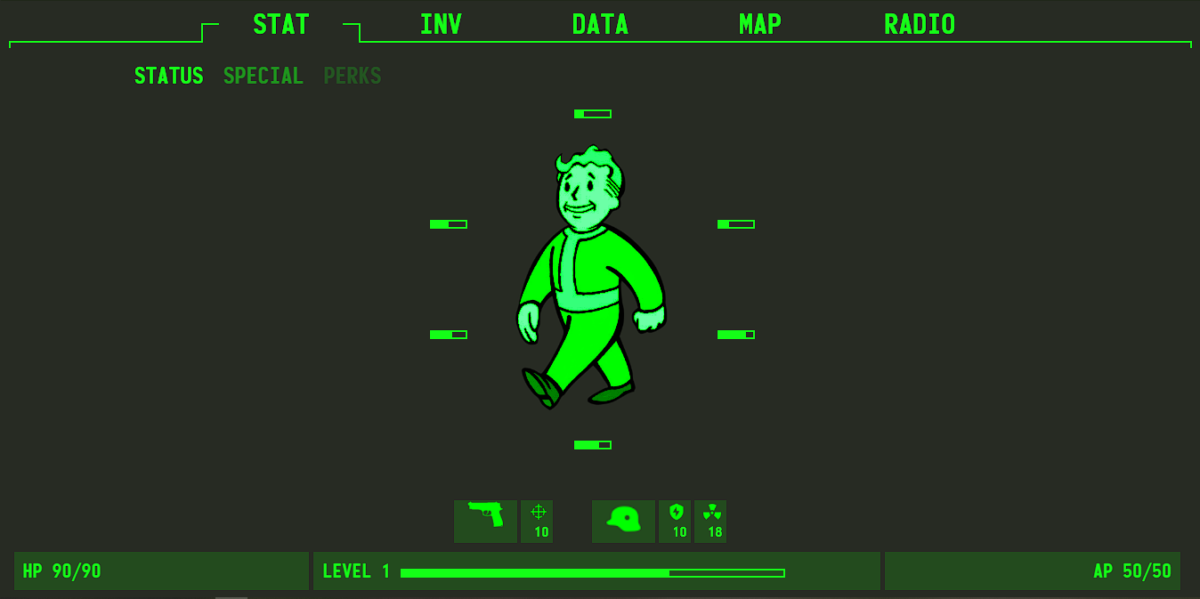
The Pip-Boy’s frontend layout structure is based on a simple, repeatable tab-based mechanism that guarantees uniformity throughout the interface. Each of the UI’s five main top-level tabs, STAT, INV, DATA, MAP, and RADIO, represents a significant functional category. The overall layout stays the same regardless of the tab that is selected, which lessens cognitive burden and facilitates easy navigation.
A permanent header navigation at the top of the screen enables rapid horizontal section switching and highlights the active tab. The major content, which includes player statistics, inventory items, quest information, maps, and radio stations, is shown in an organized and legible manner in the central area. Status indicators at the bottom offer crucial background information, enhancing the sense of a system.
Why the PipBoy Is a Design Masterpiece
Even without backend logic, the PipBoy excels because it:
- Maintains strict visual consistency
- Uses clear navigation patterns
- Balances aesthetics with functionality
- Presents large datasets without overwhelming users
- Reinforces brand identity through UI alone
Building the project
This project recreates the Pip-Boy interface in a frontend-only architecture, emphasizing visual structure and fundamental interactions above entire game logic. There is a primary menu bar at the top of the screen, as well as a sub-menu meant to replicate the original Pip-Boy. The player character, represented by the Vault Boy, is displayed in the center of the layout. This visual element displays the player’s current status and serves as the interface’s focal point.
Several status markers are displayed beneath the Vault Boy, including indicators for weapons, targeting, radiation, energy, and helmet condition, giving the interface a data-driven dashboard appearance. The footer area provides important player information such as HP level, progress bar, and AP (Action Points). These items are kept visible to ensure consistency across the UI. The project’s INV (Inventory) menu displays weapon listings as well as basic status information.
When a user hovers over a weapon, more information is shown, resulting in a simple interactive effect built using JavaScript. The project is excellent for beginners in frontend development because it largely relies on HTML, CSS, and JavaScript. While it does not quite duplicate the functionality of the Fallout 4 Pip-Boy, it does serve as a useful learning tool. Users are urged to download the project, investigate the code, and make their own enhancements.
How to use this project?
- Download the project.
- Extract the source code.
- Set up Editor or IDE. (vs code, sublime text, atom)
- Open the project.
- Execute the code on browser. (chrome, firefox)
- Enjoy!
Ready to sharpen your frontend skills with a real-world inspired UI? Download the PipBoy frontend project and start exploring the code today. Customize the layout, enhance the interactions, and experiment with new features to make the interface your own.
FAQs
1. What is the Pip-Boy project?
The Pip-Boy project is a frontend-only UI recreation inspired by the Pip-Boy device from Fallout 4. It focuses on layout, styling, and basic interactions without any backend functionality.
2. Does this project include backend logic or a database?
No. This project is purely frontend-based and uses only HTML, CSS, and JavaScript. There is no backend, server, or data persistence.
3. Is this project a replica of the Fallout 4 Pip-Boy?
No. It is a visual and structural inspiration, not a full replica. Some features are simplified or non-functional to keep the project beginner-friendly.
4. What technologies are used in this project?
The project primarily uses HTML for structure, CSS for styling and layout, and JavaScript for basic interactivity such as hover effects and menu switching.
5. Who is this project suitable for?
This project is ideal for beginners and early-intermediate frontend developers who want to practice UI layout, DOM manipulation, and interface design.
6. What functionality is implemented in the INV (Inventory) section?
The inventory section displays weapon listings, and hovering over an item reveals its basic status or details using JavaScript-based interactions.
7. Does the Vault Boy change dynamically based on stats?
In the basic version, the Vault Boy is static and represents the player visually. Dynamic stat-based animations can be added as future enhancements.
8. Is the project responsive for mobile devices?
By default, the project may not be fully responsive. Responsiveness can be added using media queries and flexible layouts as an improvement.