

Introduction
A virtual bank system built in Python is one of the most practical beginner-to-intermediate projects for understanding software architecture, data handling, user authentication, and backend logic.
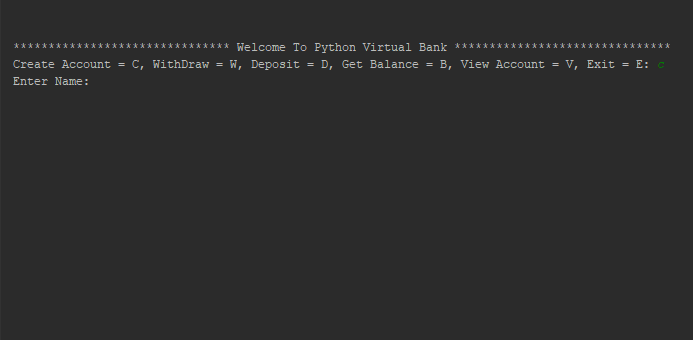
A virtual bank system is a software program that simulates basic banking operations. Instead of interacting with actual financial institutions, users interact with a controlled digital environment where they can create accounts, deposit money, withdraw funds, check balances, and view account details. These operations mirror how actual banking platforms operate at a conceptual level.
Each operation forces you to understand validation, error handling, and transactional consistency. You learn how to design a data model that stores user information, account numbers, and balances. You also see how financial rules like preventing overdrafts or rejecting invalid inputs translate into conditional logic. The system can run using simple text-based input,
A virtual bank system teaches:
- How financial transactions work in backend software
- The importance of data validation and error handling
- Secure handling of user input
- Designing modular system components
- Persisting and retrieving account data
- Structuring business logic similar to real financial applications
Core features
Create account
Account creation is the system’s base of virtual bank. It takes user information, assigns a unique account number, records the initial deposit, and keeps everything in permanent storage. The value is not in the form, but in the validation. If you ignore the checks for duplicate accounts, invalid inputs, and missing data, the entire banking logic fails. This phase affects whether your system will remain consistent or become unreliable from the start.
Deposit money
A deposit feature changes an account’s balance after checking that the account exists and the amount is correct. The key lesson is about transactional precision. If you do not enforce positive amounts, handle input errors, or log deposits, your financial records will fail immediately. This operation teaches you how to maintain data integrity and ensure that each update is completed correctly without corrupting stored values.
Withdraw money
Withdrawals reveal whether your reasoning is disciplined. The system must authenticate the account, confirm the withdrawal amount, determine the available balance, and avoid overdrafts. Mistakes here result in negative balances or incorrect data, which are precisely the types of errors that genuine financial systems cannot tolerate. This feature enforces stringent validation, appropriate error messages, and careful balance updates to prevent the system’s financial state from being corrupted.
Check balance
Balance checking retrieves the current amount kept in an account. While it appears simple, it is where you can test whether your data persistence is working properly. If deposits or withdrawals were not processed properly, the balance will show it. The function facilitates the retrieval of appropriate data, accurate storage updates, and clean read-only access to financial information, while preventing unintended modifications.
View account details
Viewing account details brings together all saved data name, account number, account type, balance, and maybe transaction history. This feature evaluates the structure of your data model. If your records are not properly arranged, the result will be jumbled or incomplete. It forces you to provide clean, accessible account data and ensures that all fields are consistent throughout actions such as deposits and withdrawals.
Project Extension
You can extend the virtual bank project by applying these features.
- Transaction History logs every deposit, withdrawal, timestamp, and resulting balance.
- Authentication System secures accounts using usernames, passwords, OTP simulation, or PINs.
- Account Types let users choose savings, current, fixed deposit, or loan accounts.
- Interest Calculation applies monthly or yearly automated interest to balances.
- Fund Transfer enables sending money between user accounts securely.
- Admin Dashboard allows viewing all accounts, editing records, and freezing accounts.
- API-Based Banking turns the virtual bank into a REST API using Flask.
- Graphical Interface provides a desktop-like experience using Tkinter or PyQt.
- Database Integration stores real account data using SQLite or MongoDB.
How to use this project?
- Install Python version 3.
- Download the project and extract the source code.
- Set up an editor or IDE.
- Open the Python file in an editor.
- Execute the program.
- Start using the project.
Download the complete Python Virtual Bank System now and get instant access to every feature you need to build a professional, fully functional banking application.