



Introduction
A student management system in C is a console-based application that manages student information such as names, roll numbers, grades, attendance, and other academic records.
A student management system is useful for managing students’ records in any school, university, or academic institution. It typically manages information such student names, roll numbers, grades, courses, and attendance records. Because C program does not have built-in database support, the system relies on data structures and file handling techniques to store and retrieve information permanently.
At its core, the system functions by creating a structured format for student data and carrying out actions such as adding new records, examining current records, searching for specific students, editing information, and deleting records. These actions imitate fundamental database functionality but are manually executed, necessitating a better understanding of how data is managed internally.
This type of system is popular as a learning project since it incorporates several fundamental programming principles, such as structures, pointers, conditional logic, loops, and file operations. However, a student management system written in C has limited scalability and usability. It frequently lacks a graphical user interface and is incapable of efficiently handling massive datasets or several users at the same time.
How does the system work?
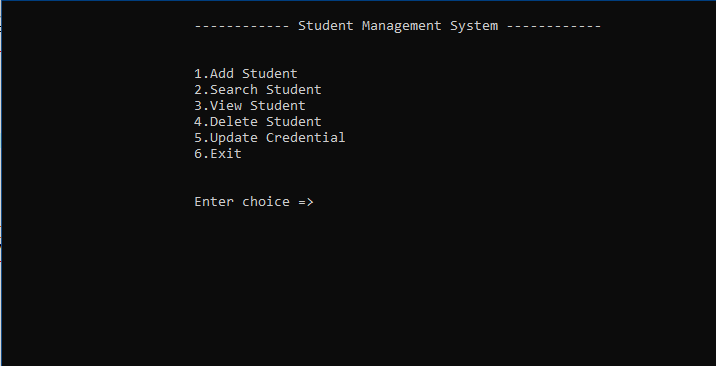
A student management system in C functions through a menu-driven interface where users pick tasks such as adding, viewing, deleting, updating, and deleting records and exiting.
Typically, the process goes as follows:
- The application initializes and loads current data from a file.
- The user chooses an operation from the menu.
- The system processes the input and executes the required action.
- Data is updated in memory and then written back to the file.
- The system loops till the user exits.
Features of the student management system
Add student
The add feature enables the user to add new records by collecting essential details such as name, ID, date of birth, and other academic information. t ensures data is structured correctly before saving into a file. Poor input handling here leads to corrupted data and affects all other operations downstream.
View student
The View feature displays all stored student records in a readable format. It verifies whether data is being saved and retrieved correctly from the file or not. This feature is crutial for checking whether the data and operations are working correctly. f the data structure is poorly designed or inconsistent, the output becomes messy and difficult to interpret.
Search student
The Search tool allows users to locate a specific student record by utilizing a unique identifier, typically a student ID. It operates by scanning through stored records in order and comparing each entry until a match is found. The effectiveness of this feature is dependent on how well the data is arranged. If IDs are not unique or entries are stored inconsistently, the search results will be wrong.
Delete student
The Delete function deletes a specific student record based on a supplied ID. Unlike simple operations, deletion in C frequently requires establishing a temporary file, copying all records except the target one, and then replacing the original file. This feature pushes you to thoroughly comprehend file manipulation and emphasizes the need of proper data handling in real-world systems.
Update student
The Update Credentials tool allows you to change your system login information, such as username and password. It adds a basic layer of access control to ensure that only authorized users interact with the system. However, with a rudimentary C implementation, credentials are frequently saved in plain files, leaving them exposed to security threats. This feature is insecure in the real world because it lacks encryption and hashing capabilities. It emphasizes the difference between simple academic systems and production-level secure applications.
Exit
The Exit functionality safely shuts the program once all operations are completed. It guarantees that any modifications performed during the session are correctly saved and closed. A poorly implemented exit procedure can result in unsaved data or file corruption, so this step is more crucial than most beginners assume.
Building the project
Building a student management system in C requires a careful logic structuring. The project starts with creating a clear data model that uses struucture to capture student information. This stage is cruial since the organization of data determines how well the system operates. You must compile and execute the project. You can download the Dev C++ editor. The source code for this project is available in this blog.
The next step is to design the program flow. Because the system is console-based, it often employs a menu-driven approach that interacts with the user until termination. This necessitates rigorous control over loops, conditional statements, and function calls. Each process should be modular, with different functions handling specific responsibilities. Without modularity, code can soon become unmanageable and impossible to debug.
The project relies heavily on file handling. Instead of using databases, the system stores data in binary files, which increases efficiency and ensures permanence. You must carefully control file operations such as opening, reading, writing, and shutting files. Any error at this layer might cause data corruption or loss, which is where most beginners fail.
When you run the project, a loading text will appear on screen. Pressing any key will take you to the login screen. To access the main menu, enter your username as the user and your password as the password.
How to use this project?
- Download the project and extract the source code.
- Get the software Dev C++ or any other.
- Set up the code in editor.
- Compile and execute the code.
- Use the project.
- Enjoy and share.
Stop consuming tutorials without building. Create your own student management system in C from the ground up, breaking, fixing, and improving it. Then improve it by adding file optimization, increasing search performance, or redesigning the structure. That is how you progress from knowing syntax to being a developer who truly understands systems.
Click the download button now for downloading the project and get experienced by yourself.