

Introduction
This Flutter quiz app project is designed to help beginners and intermediate developers understand how interactive logic, user input handling, and real-time feedback work in a mobile application.
A Flutter Quiz App is a simple yet engaging mobile application that lets users answer questions and instantly see how they did. Instead of passively reading content, users actively participate by tapping answers and getting immediate feedback. This makes quiz apps especially effective for learning, self-assessment, and even casual entertainment. Typically, the app displays a question on the screen, offers clear answer options through buttons, checks the response, and shows the result right away, keeping the experience smooth and interactive.
One reason Flutter quiz apps are so popular is Flutter’s ability to build cross-platform apps from a single codebase. With the same project, developers can deliver a consistent experience on both Android and iOS without duplicating work. Flutter is maintained by Google, which means the framework benefits from long-term support, regular updates, and a strong ecosystem. For users, this translates into fast performance and a polished interface; for developers, it means efficiency and reliability.
In a basic Flutter quiz app, questions appear one at a time to keep users focused. The interaction is straightforward users select answers such as True or False, and the app immediately evaluates their choice. Feedback is shown using subtle UI elements like SnackBars, dialogs, or color highlights. These cues help users understand whether they were right or wrong without breaking the flow of the quiz.
Flutter quiz apps are commonly used in:
- Educational platforms
- School and college learning tools
- Interview preparation apps
- Practice tests and mock exams
Why Flutter Is Ideal?
- Cross-platform compatibility
- Smooth animations
- Fast UI rendering
- Consistent design across devices
- Strong community support
User Interface and Layout Design
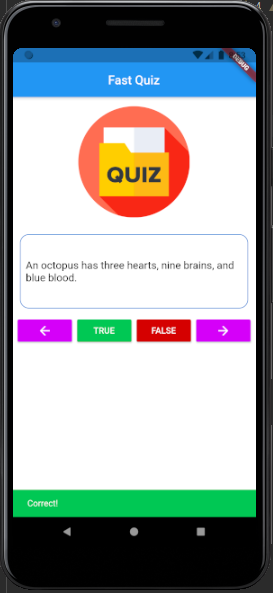
The user interface of the Flutter quiz app is kept simple and clean so users can focus on answering questions without distraction. The design includes images, buttons and other necessary elements and presents what is needed on the screen. This makes the app easy to understand, even for first-time users.
The question is displayed in a dedicated area at the top or center of the screen. A light border around the question helps separate it from the rest of the layout, making it clear what the user should read. The text size and spacing are chosen to ensure good readability on all screen sizes.
Below the question, the True and False buttons are placed clearly and evenly. These buttons are large enough to tap comfortably and are easy to recognize as the main action buttons of the app. Their simple placement helps users make quick decisions without confusion.
The layout uses a vertical structure, so the flow feels natural question at the top and answers below. Proper spacing between elements keeps the screen from feeling crowded. When a user selects an answer, feedback appears at the bottom of the screen using a SnackBar, which does not block the question or buttons.
Learning Objectives
- Handling user input through buttons
- Implementing conditional logic for answers
- Displaying real-time snackbar feedback
- Managing app flow and state
- Designing simple yet effective UI layouts
Building the project
This Flutter quiz trivia app is built using Dart, the programming language designed specifically for fast, smooth, and efficient app development. Dart works around Flutter’s widget-based system, where everything on the screen is a widget. For this project, a stateful widget is used because the app needs to update its state every time a new question appears or an answer is selected.
The overall layout of the app is intentionally kept simple, making it ideal for beginners. The focus is placed on the question itself, with a clean question area that uses a subtle border outline for clarity. An image is also included to make the interface more visually engaging without distracting the user from the quiz content.
To collect answers, the app uses clearly labeled True and False buttons. When the user taps either button, a SnackBar appears at the bottom of the screen to instantly show whether the selected answer is correct or incorrect. This immediate feedback keeps the experience interactive and easy to follow. After an answer is given, the app automatically moves on to the next question, creating a smooth and uninterrupted quiz flow.
Several core Flutter UI elements are used throughout the project, such as rows and columns for layout, containers for structure, and widgets to manage different parts of the interface. A scaffold provides the basic screen framework, while lists help manage the set of questions. These elements work together to form a clean and responsive design.
Overall, this project is straightforward, user-friendly, and perfect for learning Flutter fundamentals. To run and test the app, you will need a device emulator or a physical device. Download the Flutter quiz trivia app and explore it hands-on to gain practical experience.
How to use this project?
- Download the project.
- Extract the zip file & get the folder.
- Set up an editor or IDE. (vs code, Intellij idea, android studio)
- Copy the folder to your project.
- Launch the program in the emulator.
- Play the quiz.
- Enjoy & Share.
Ready to put your Flutter skills into practice? Download the Flutter Quiz App project and start experimenting with it today. Run it on an emulator, explore how the questions update, and see how real-time feedback works with SnackBars. Customize the design, add more questions, or extend it with scoring and timers to make it your own.
The best way to learn Flutter is by building, so click the button below and dive in, tweak the app, and gain real hands-on experience.