

Introduction
Event keycodes are numeric values historically used in JavaScript to identify which keyboard key a user pressed during a keydown, keyup, or keypress event.
Keyboard interactions are at the core of modern web experiences. Modern JavaScript now relies on event.key, event.code, and improved keyboard event handling standards that provide cleaner, more semantic, and more predictable behavior. Learning both the old and new approaches ensures compatibility, maintainability, and cleaner code for real-world applications. When a keyboard event occurs, the browser generates an event object, and the old evemt.keyCode property would return a number representing that specific key.
For example, the Enter key had a event keycode of 13, the Space key 32, ArrowUp 38, and the letter “A” 65. Developers used these values to create keyboard shortcuts, control form behavior, make interactive games, or trigger custom actions based on key input. However, while keycodes were widely used for years, they are now considered deprecated.
While the traditional keyCode, which, and charCode properties are now deprecated, developers still encounter them across legacy codebases, tutorials, and libraries. Modern JavaScript now prefers event.key, event.code, and event.keyCode. For complete mastery, you must understand both the old and new approaches, especially because many real-world applications still depend on keyCode-based logic.
Despite being deprecated, event keycodes still work in all major browsers because many older projects rely on them. Legacy systems, outdated tutorials, or older libraries may still use numeric key detection, which makes understanding event keycodes useful for maintenance and debugging.
Modern Replacement: event.key and event.code
Event.key
Event.key provides the exact character or action generated when a user presses a key. It is layout-dependent, meaning it reflects the user’s actual keyboard language and character output. This makes it ideal for text input handling, form interactions, accessibility navigation, and semantic key detection
document.addEventListener("keydown", e => {
  console.log(e.key); // "Enter", "a", "A", "ArrowLeft"
});
Event.code
Event.code identifies the physical key location on the keyboard, regardless of the user’s language or layout. This makes it ideal for controlling games, detecting WASD movement, implementing global shortcuts, and ensuring consistent behavior across different regions.
document.addEventListener("keydown", e => {
  console.log(e.code); // "KeyA", "Digit1", "Space", "ArrowUp"
});
Common Keycodes Reference Table
| Key | Keycode |
|---|---|
| Enter | 13 |
| Space | 32 |
| Escape | 27 |
| Arrow Up | 38 |
| Arrow Down | 40 |
| Arrow Left | 37 |
| Arrow Right | 39 |
| A | 65 |
| B | 66 |
| C | 67 |
| 0 | 48 |
| 1 | 49 |
| 2 | 50 |
Building the proejct
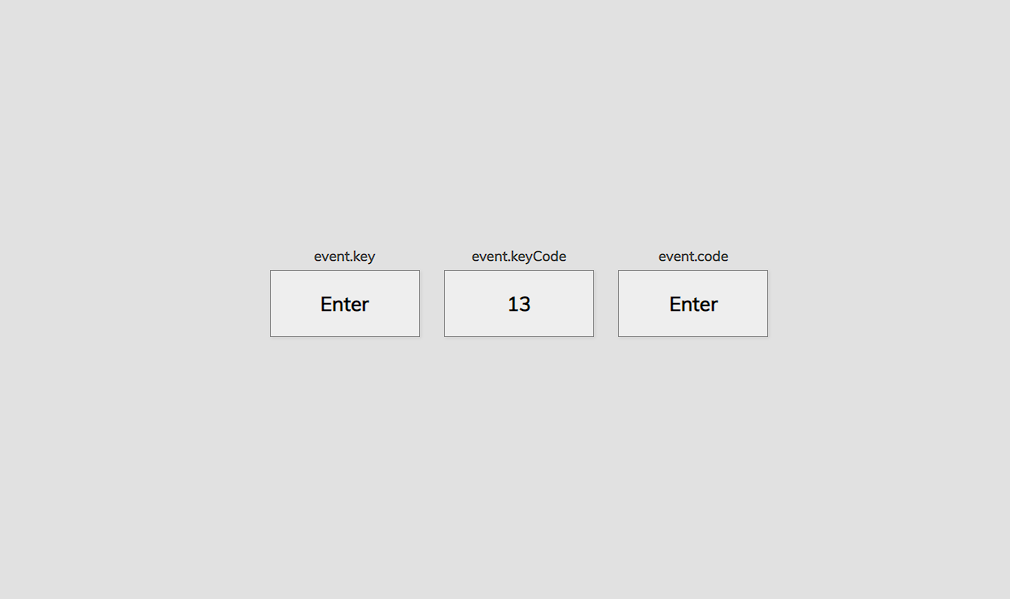
This Event Keycode project is built with HTML5, CSS3, and JavaScript. HTML structures the interface, CSS handles the layout and visual styling, and JavaScript drives the logic that detects and displays key information. The JavaScript listens for keyboard events and instantly outputs details such as the key pressed and its corresponding keycode.
The concept is inspired by online JavaScript keycode tools, but implemented in a simplified, beginner-friendly format. When the page loads, pressing any key triggers the script to show its keycode for example,”D” returns 68 and the Spacebar returns 32. Press any key to view its code instantly.
Event Properties You Must Know
| Property | Description |
|---|---|
| e.key | The actual key pressed (readable) |
| e.code | Physical key location |
| e.keyCode | Deprecated numeric key identifier |
| e.ctrlKey | Boolean indicating Ctrl pressed |
| e.shiftKey | Boolean indicating Shift pressed |
| e.altKey | Boolean indicating Alt pressed |
| e.metaKey | Command key on macOS |
Why keyCode Was Deprecated
- The property never became part of an official web standard and was only kept for legacy compatibility.
- Some keys might not represent the same character on international keyboards.
- Assistive tools need semantic labels, not cryptic numbers.
- W3C unified everything under the newer KeyboardEvent standard.
- Different browsers historically assigned different keycodes to the same key.
- event.key and event.code replaced keyCode by offering human-readable and more accurate values.
How to use this event keycode project?
- Download the project.
- Extract the zip file & get the folder.
- Set up an editor or IDE.
- Open the project folder on the editor. (vs code, atom)
- Launch the program in the browser. (chrome, firefox)
- Get your targeted keycode of the keyboard.
- Enjoy & Share
If you want to see how keyboard event keycode work in real time, use the live Event Keycode tool included in this project. Press any key and instantly view its keycode, key value, and physical code.
It’s a quick way to understand how JavaScript handles keyboard interactions, especially if you’re learning or debugging. Press the button below to get the source code for event keycode project.