

Introduction
A double vertical slider is a visually striking and highly interactive user interface component commonly used in modern web design. It consists of two vertical panels placed side by side.
A double vertical slider is a modern and interactive web design pattern that places two vertical panels side by side and moves them in opposite directions as users navigate through the content. When a visitor clicks navigation arrows, buttons, or scrolls, one panel smoothly slides upward while the other moves downward. This opposing motion creates a sense of depth and flow, making the transition feel more engaging and visually appealing than standard horizontal sliders or single-panel carousels.
This type of slider is often seen on contemporary landing pages, creative portfolios, and product showcase websites where visual impact matters. Typically, one panel is used to display images, illustrations, or background visuals, while the other focuses on text such as titles, short descriptions, or calls to action. By clearly separating visuals from text, the layout becomes easier to follow and helps tell a story step by step without overloading the user with information.
Behind the scenes, a double vertical slider relies on a clean combination of web technologies. HTML provides the basic structure and organizes the content logically. CSS is responsible for the layout, styling, and smooth animation effects that make the sliding motion feel natural. JavaScript connects everything by handling user interactions and keeping both panels perfectly synchronized as they move. This clear division of roles makes the slider easier to maintain and extend.
What truly makes a double vertical slider appealing is how it directs attention. The contrasting movement naturally catches the eye and invites users to explore further. When animations are smooth and content is kept concise, this slider style can noticeably improve user engagement and encourage visitors to spend more time interacting with the page.
Why Double Vertical Sliders Are Popular
A double vertical slider is an interactive web user interface pattern that displays two vertical panels side by side, where content moves in opposite vertical directions during navigation. As a user interacts with controls such as arrows, buttons, or scroll actions, one panel slides upward while the other slides downward. This synchronized, opposing motion creates a visually engaging transition that feels more dynamic than traditional horizontal sliders or single-panel carousels.
This design pattern is commonly used in modern landing pages, creative portfolios, and product showcase websites. One side of the slider often presents visual elements such as images or background graphics, while the opposite side displays supporting content like headings, descriptions, or calls to action. By separating visual and textual information, the double vertical slider improves focus and storytelling without overwhelming the user.
From a technical perspective, the structure of a double vertical slider is defined using semantic HTML, styled and animated with CSS, and controlled through JavaScript-based logic. CSS handles vertical alignment, positioning, and smooth transition effects, while JavaScript synchronizes the movement of both panels and manages user interactions. This separation of responsibilities follows modern front-end best practices and results in a clean, maintainable implementation.
Building the project
This double vertical slider project is created using HTML5, CSS3, and JavaScript, with each technology playing a clear and specific role. HTML is used to structure the content, placing text and images in the browser in a clean and organized way. It forms the foundation of the layout and ensures that all elements are logically arranged.
CSS is responsible for the visual presentation of the project. It styles the text, images, and overall appearance while also defining the complete layout of the slider. The split-screen structure and vertical alignment of both panels are achieved through CSS, along with smooth transitions that make the sliding motion feel natural and polished. Custom fonts from Google Fonts are used to enhance typography and improve the overall visual appeal.
JavaScript adds interactivity to the project by controlling the sliding behavior. A click event listener is attached to the arrow buttons, allowing users to move between slides with a simple interaction. Each click triggers a smooth vertical transition, keeping both panels perfectly synchronized.
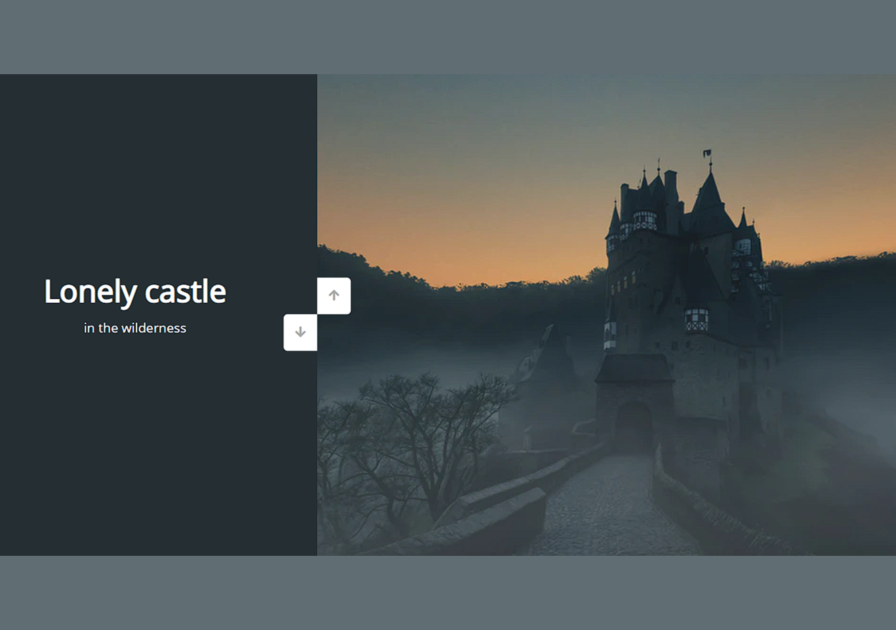
In this layout, the left panel is intentionally smaller and focuses on descriptive text, while the larger right panel highlights the corresponding images. This balance helps guide the user’s attention and improves clarity. Download the double vertical slider project and experience the interaction firsthand.
How to use this project?
- Download the project and extract the source code.
- Set up an editor or IDE. (vs code, sublime text, atom).
- Open the project folder on the editor.
- Launch the program in the browser. (Google Chrome, Mozilla Firefox, Brave)
- Use the project.
- Enjoy & Share.
Ready to see it in action? Download the double vertical slider project now and explore how HTML, CSS, and JavaScript work together to create a smooth, eye-catching interaction. Customize it, experiment with the layout, and use it as a foundation for your own modern web designs.