


Introduction
The Country Quiz Android App is a beginner-friendly yet highly engaging mobile application developed using Java programming for the Android platform. This project includes multiple-choice questions related to countries.
A Country Quiz App is an interactive educational mobile application designed to help users learn about countries through short, engaging quiz questions. Instead of memorizing facts from textbooks, users actively participate by answering questions related to country names, flags, capitals, continents, and basic geographic facts. This active involvement makes learning feel lighter, faster, and more enjoyable.
The strength of a country quiz app lies in its simplicity. Users open the app, read a question, select an answer, and instantly receive feedback. This immediate response helps users quickly understand their mistakes and remember correct information more effectively. Over time, repeated exposure to questions improves geographical knowledge and confidence without feeling like traditional studying.
Educational research strongly supports this learning method. Quiz-based learning, also known as retrieval practice, has been shown to improve memory retention and understanding compared to passive reading significantly. When users actively recall information, the brain strengthens long-term learning pathways. Country quiz apps also help build global awareness. Learning about different countries encourages users to think beyond their local environment and understand the wider world.
Core features
Interactive question system
The app presents one question at a time, helping users focus without feeling overwhelmed. Each question is simple, clear, and centered on a single country-related idea. This step-by-step learning style keeps users engaged and improves understanding by avoiding information overload.
True/False answer format
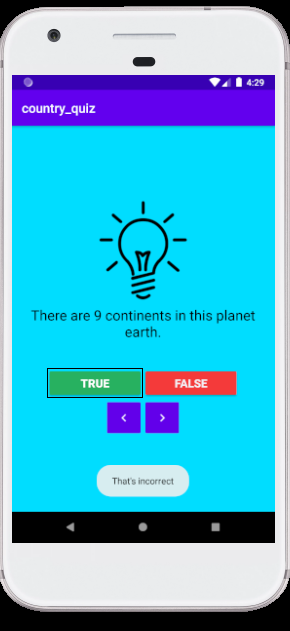
Users choose answers just by clicking the true or false button, making the quiz easy to understand and use. This familiar format reduces confusion, especially for beginners and younger users, while encouraging quick decision-making and active participation in the learning process.
Instant feedback
As soon as an answer is selected, the app immediately shows whether it is correct or incorrect. This real-time feedback helps users learn from mistakes instantly and strengthens memory by reinforcing correct information at the right moment.
Score tracking
The app continuously tracks the user’s score during the quiz session. Seeing progress in real time adds motivation and turns learning into a challenge. Users are encouraged to replay quizzes and improve their scores, which supports consistent learning habits.
Simple and clean user interface
The interface is designed to stay clean and distraction-free. Clear text, well-spaced buttons, and minimal layout elements help users focus entirely on the quiz. A simple design improves usability and reduces cognitive effort while answering questions.
Smooth Navigation
Navigation within the app is intuitive and smooth, allowing users to move easily between questions and screens. Clear navigation controls prevent frustration and create a seamless flow, ensuring users stay engaged from the beginning of the quiz to the end.
Building the Country Quiz App
The Country Quiz App is designed to be simple, interactive, and easy to use. Users answer each question by tapping True or False on the screen. As soon as an option is selected, the app displays a toast message to provide instant feedback. If the chosen answer is correct, the message confirms it; if not, the app clearly indicates that the answer is incorrect. This immediate response helps users learn quickly and stay engaged.
To improve navigation, the app includes Next and Previous buttons. The Next button allows users to move forward to a new question, while the Previous button lets them revisit earlier questions. This flexible navigation makes the quiz more user-friendly and allows users to review their answers at any time.
The screen layout is created using a LinearLayout, which keeps the interface clean and well-structured. For the visual design of the app, XML is used to define and organize all user interface elements. All quiz questions are stored in the strings.xml file, making the content easy to manage and update. An array is used to hold and cycle through the questions efficiently during the quiz.
Although quiz applications can be built using other programming approaches, this project is developed specifically as an Android application. It offers a practical way to learn Android app structure, user interaction, and resource management. Working on this Country Quiz App helps developers gain hands-on experience with core Android concepts, making it a productive and valuable learning project.
How to use this project?
- Download and extract the source code.
- Open android studio IDE.
- Set up the source code in the IDE.
- Execute the code in an emulator.
- Start playing the quiz.
- Enjoy!
If you are learning Android development or want to strengthen your Java programming skills, this country quiz App is a perfect project to work on. Download the project, explore how the quiz logic and user interface are structured, and customize it with your own questions.
Build it, improve it, and turn it into a stronger addition to your Android development portfolio.