

Introduction
A Baby Care Android App is a mobile application designed to help parents and caregivers manage daily baby-related activities. The app is easy to use and implement as well.
This Baby Care Android App is developed using Java, focusing on how task management concepts are adapted to parenting needs. The app does not replace medical advice; instead, it acts as a digital assistant for parents, helping them track, plan, and manage baby-related responsibilities efficiently. This project is also an excellent example of applying core Android and Java concepts to a real-world use case.
Java is a high-level programming language. It is a useful program useful in-game and app development. Baby care android app works correctly without error. It simple and fun. This app is built for educational purposes. You will require an android studio IDE for using this project. Android studio is a very useful IDE for building native android apps. Baby care app uses SQLite database for saving and retrieving items.
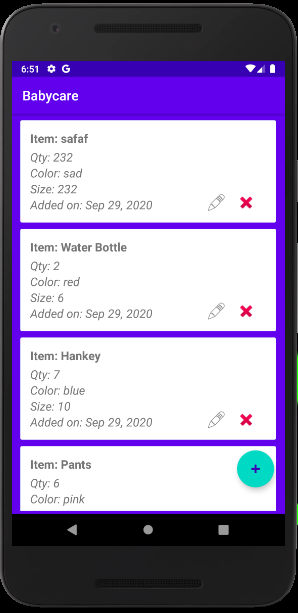
Baby care app can perform CRUD operations. It is connected with the SQLite database to perform CRUD. Create, Read, Update and delete. Android Studio allows you to write java and design at the same time. It uses java class for writing java and xml for designing. The project has a friendly user interface. Just download and execute the project. The baby care Android app is fully functional.
At its core, the app functions as a task management system, but the terminology, user interface, and workflows are optimized for parenting. Each “task” represents a baby-related activity, allowing parents to focus on care rather than manual tracking.

Why use task management for baby care?
- Centralized tracking of all baby-related tasks
- Time-based reminders for critical activities
- Clear daily routines and schedules
- Reduced mental load for parents
- Shared visibility for both parents or caregivers
Role of Java in Android App Development
Java is a powerful yet silent tool for creating Android apps. Although Java isn’t typically visible on the screen, Java operates in the background and powers all of the app’s functions, including updates, taps, and reminders. Java serves as the application’s brain in a project like the Baby Care Android App, ensuring that the program operates in a dependable and predictable manner. Java is the language that recognizes and determines what should happen when a parent adds a baby task, marks it as finished, or gets a reminder.
It links the software’s logic to user activities. Without Java, the application would be nothing more than a collection of static panels. Java’s ability to be structured and ordered is one of its greatest advantages. Apps for baby care deal with repetitive duties, such as daily feedings and naps. Java uses reusable logic and explicit rules to naturally handle these patterns. Because parents depend on the app daily, it becomes easier to maintain and less prone to faults. For Android development, Java is also incredibly user-friendly for beginners. Clean thinking is encouraged by its syntax.
Java encourages developers to conceive in terms of objects and responsibilities rather than complicated or unexpected logic. A baby task, for instance, can be viewed as a separate object with its own data and behavior. This method makes the code easy to understand and reflects actual life. Stability is another crucial function of Java. Android apps need to be compatible with a wide range of Android versions, screen sizes, and devices. Since Java has been a part of Android for many years, it is reliable and well-tested. This stability guarantees that the application won’t abruptly crash, particularly at crucial times like task updates or reminders.
Key features of this project
- The app manages baby care activities by treating them as simple, organized tasks.
- Parents can add baby-related tasks quickly without complex steps.
- Tasks are organized into clear categories like feeding, sleep, and hygiene.
- A daily view shows all baby care tasks scheduled for the day.
- Completed tasks can be marked to keep routines consistent and clear.
- Reminders notify parents about important baby care activities on time.
- The interface is clean and easy to use, even during busy moments.
- All baby task data is stored locally on the device for reliability.
- Java ensures stable and smooth performance across Android devices.
- The project structure is simple, making it suitable for beginner developers.
How to use this project?
- Download the project and extract the source code.
- Open android studio IDE.
- Set up the project.
- Select android emulator.
- Execute the project code.
- Use the app.
- Enjoy!
Ready to turn this Baby Care Android App into a real, practical project? Download the source files, explore the Java-based logic, and customize the features to match real parenting needs.
Whether you are a student, beginner Android developer, or someone building a meaningful portfolio project, start working on this app today and transform a simple task manager into a helpful baby care solution.