

Introduction
A mortgage loan app is a mobile application that helps users calculate, compare, and apply for home loans directly from their smartphones. It is a loan-based cross-platform mobile application.
We are building a mortgage loan app in this project. This project is coded and designed using flutter framework. Instead of visiting banks, filling out paperwork, or waiting days for updates, users can manage the entire mortgage journey from their smartphone. These apps typically include loan calculators, EMI estimators, interest rate comparisons, eligibility checks, and secure document uploads. Users can instantly calculate how much they can borrow, explore different loan terms, and understand repayment obligations with clear visual breakdowns.
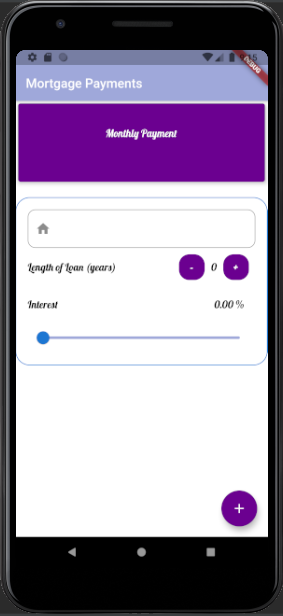
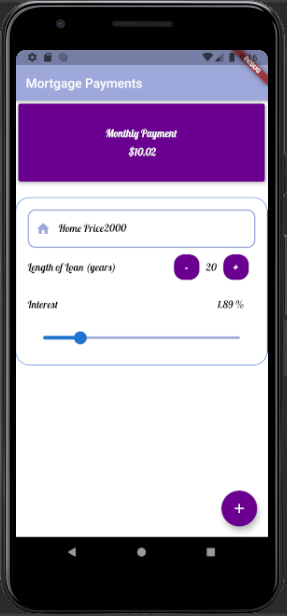
Modern mortgage apps also provide real-time application tracking, showing each stage of approval submission, verification, underwriting, and final decision. Many apps integrate identity verification, credit score checks, and personalized loan recommendations to streamline the process even further. This reduces delays, minimizes human error, and increases transparency. But in this app project, we are not doing anything professional. This is a beginner-level project that demonstrates the calculation of a loan based on interest. See the screenshots below.
Why use Flutter?
- Flutter lets you write one codebase for both iOS and Android.
- It compiles to native ARM code and uses its own rendering engine for consistent, high-performance UI across devices.
- Flutter’s widget system allows pixel-perfect, customizable design that adapts to your brand while maintaining platform norms.
- Maintenance happens once, and security updates, bug fixes, and feature rollouts apply across platforms at once.
- Flutter’s modular architecture makes scaling realistic and manageable.
- Flutter is backed by Google and supported by a large global developer community.
Building the project
The Flutter Mortgage Loan App is developed using Dart, a client-optimized programming language designed for fast and efficient app development across multiple platforms. Dart seamlessly integrates with Flutter’s widget-based architecture, making it ideal for building responsive and interactive mobile applications.
In this project, we leverage both stateful and stateless widgets to manage dynamic and static UI elements efficiently. The app also incorporates custom fonts, which are imported externally to enhance the visual appeal. Additionally, we have customized the app theme with new styles to create a unique and polished user interface.
For mathematical operations, the dart:math library is imported, enabling the use of essential mathematical functions within the app. Colors are overridden and customized, allowing us to define a consistent color palette that can be reused across the project.
Key UI elements used in this app include Row, Column, Container, Child, Children, Widget, ListView, Scaffold, Icons, and InkWell. These components work together to create a simple, clean, and user-friendly interface.
The Flutter Mortgage Loan App is fully functional and runs without errors. To test the application, you will need an emulator or a physical device. Download the app today and experience a seamless mortgage loan application process firsthand.
How to use this project?
- Download the project.
- Extract the zip file & get the folder.
- Set up an editor or IDE. (vs code, IntelliJ idea)
- Copy the files in your project.
- Launch the project in the emulator.
- Use the app.
- Enjoy & Share.
Ready to explore how Flutter brings powerful UI, smooth performance, and clean architecture into a real-world app experience? Download the Flutter Mortgage Loan App project and dive into the code yourself.
FAQs
1. What is the purpose of this mortgage loan app project?
This project is created to demonstrate how Flutter and Dart can be used to build a functional mortgage loan calculator and UI workflow. It is an educational project meant for learning UI design, state management, widgets, navigation, and theme customization.
2. Does this project process real mortgage loans?
No. This project does not connect to any real bank, financial institution, or loan provider. It only simulates features such as loan calculation and basic UI flow for learning purposes.
3. What features are included in the project?
The project includes EMI calculation, user interface layout with Row and Column widgets, custom themes, imported fonts, multiple screens, InkWell interactions, and basic navigation. It demonstrates how loan values are calculated using Dart’s mathematical functions.
4. Which technologies are used in the project?
The project is built using Flutter and Dart. It also uses the dart:math library, custom colors, themes, external fonts, and common Flutter widgets like Scaffold, ListView, Container, and Icon widgets.
5. Can I test the project on my device?
Yes. You can run the project on an emulator or physical device using Android Studio, VS Code, or any Flutter-supported environment.
6. Does this project require a backend?
No. The current version is frontend-only and focuses on UI + logic. All calculations happen locally within the app.
7. Is the project customizable?
Yes. You can modify colors, themes, fonts, widget structures, and logic to match your own design or extend it into a more advanced loan application system.
8. Is this project suitable for beginners?
Yes. It is designed to be simple, easy to understand, and ideal for beginners learning Flutter basics, widget structure, and UI development.